TinyURL vs Bitly vs Cut: Feature Comparison
TinyURL and Bitly represent two ends of the same spectrum — one is deliberately minimal, the other is fully featured but priced restrictively on volume. Most people comparing them are really deciding which trade-off they'd rather live with, which is exactly the situation worth checking a third option against before picking either. This comparison covers all three feature by feature, not just the two names most people already have in mind.
The Core Trade-Off
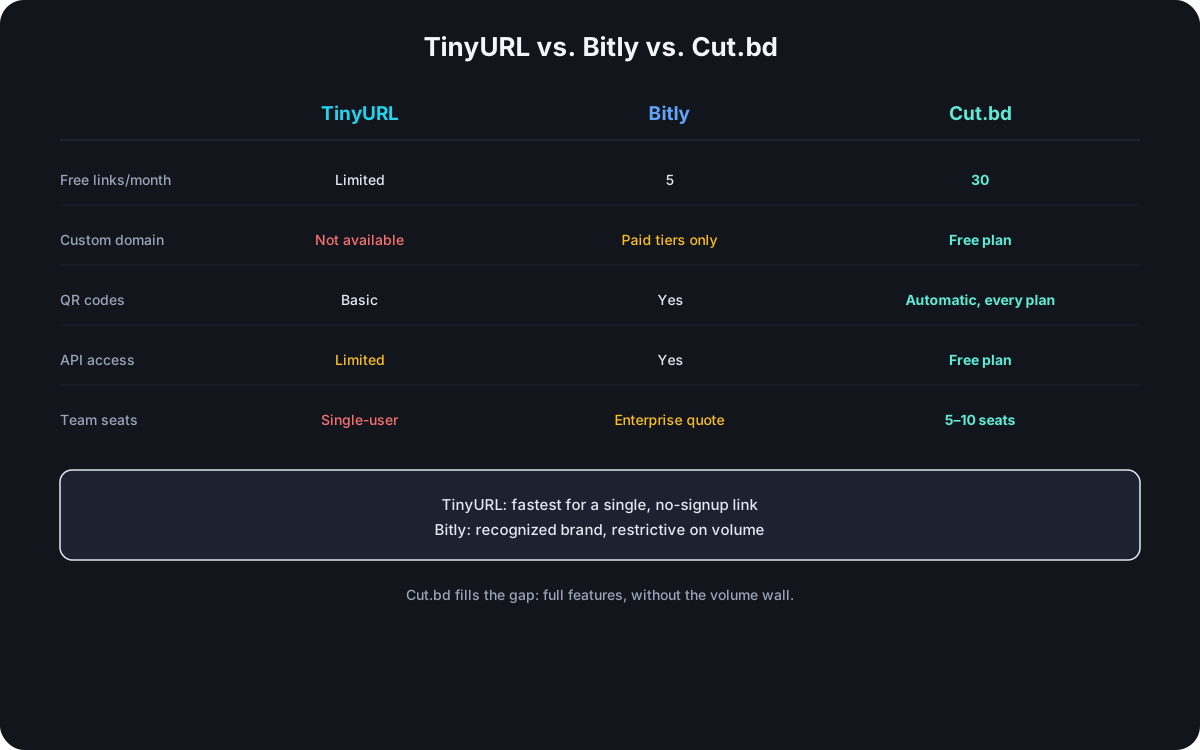
TinyURL is built around doing one thing with almost no friction: paste a URL, get a short one back, no signup required for basic use. That simplicity is also its ceiling — no native custom domain, and bulk or programmatic use outgrows it quickly. Bitly sits at the opposite end: a full feature set, but priced around link volume aggressively enough that its free tier (5 links a month) and even its $199/month Premium plan (capped at 3,000 links, still single-user) become the actual constraint for any team with real usage. Cut.bd's positioning is specifically about not forcing that trade-off — full features without Bitly's volume ceiling.
Feature-by-Feature Comparison
| TinyURL | Bitly | Cut.bd | |
|---|---|---|---|
| Free tier links/month | Limited | 5 | 30 |
| Custom domain | Not available | Paid tiers only | Included, Free plan |
| QR code generation | Basic | Yes | Automatic, every plan |
| API access | Limited | Yes | Included, Free plan |
| Analytics retention | Minimal | Tiered by plan | Tiered by plan |
| Team seats | Single-user | Enterprise quote for multi-seat | 5 seats (Team), 10 (Ultimate) |
Where TinyURL Actually Wins
Speed and zero friction, genuinely. For a single link shared once — a text message, a quick share with no tracking need — TinyURL's no-signup path is faster than any tool that requires an account first. It's the right tool for that specific job, not a worse version of something else.
Where Bitly Actually Wins
Brand recognition and maturity. Bitly's name is trusted by default in a way no competitor fully replicates, and its API and documentation are mature enough that integrating against it rarely surprises anyone. That's a real advantage in situations where the shortener's own brand visibility matters — though it's a narrower advantage than the company's market position might suggest, and it doesn't offset the volume pricing for teams past a handful of links a day.
Where Cut.bd Differs From Both
Cut.bd's free tier includes what both competitors gate or omit: a custom domain and API access from day one, a 30-link monthly allowance well above Bitly's 5, and automatic QR codes on every plan rather than as a separate feature. It doesn't match TinyURL's zero-signup simplicity for a genuine one-off link, and it doesn't carry Bitly's brand recognition — the trade-off is a less-known name in exchange for not hitting a volume wall in the first week of real use.
API and Integration Depth
For anything programmatic, the gap between the three widens beyond what the feature table shows. TinyURL's API covers basic shortening but stops there — no native custom-domain parameter, and bulk creation isn't a first-class endpoint, so anything beyond occasional scripted use runs into the same ceiling its UI does. Bitly's API is mature and well-documented, which matters when integrating against unfamiliar docs under time pressure, but the same link-volume pricing that constrains the dashboard constrains the API — a script creating links per user action hits Bitly's ceiling exactly as fast as a person clicking a button would. Cut.bd's API includes custom domain support and bulk creation from the Free plan, with documented rate limits that scale by tier rather than gating the API itself behind a separate purchase.
Which One Fits Your Situation
- A single link, shared once, no tracking need — TinyURL's no-signup path is the fastest option and there's no reason to overthink it.
- Brand recognition matters more than cost-per-link — Bitly, if the budget for its paid tiers is already accounted for.
- Custom domain, API access, and real volume on a limited budget — this is the gap both alternatives leave, and where Cut.bd is specifically built to fit.
Frequently Asked Questions
Is TinyURL or Bitly better for a small business? Depends on volume — a business creating a handful of links a month can use either comfortably; the moment links-per-month climbs into the dozens, TinyURL's feature gaps and Bitly's pricing both become real constraints, just in different ways.
Does TinyURL have an API at all? A limited one — enough for basic programmatic shortening, but without the custom domain or bulk-creation support a growing integration typically needs.
Can I migrate from TinyURL or Bitly to another shortener later? Generally yes for the link list and destinations; click history typically doesn't transfer since it's stored per-platform, the same limitation covered in the full Bitly alternatives comparison.
Is Bitly's brand recognition worth the price difference? Only if the shortener's own visibility is part of what you're paying for — for internal tools, transactional links, or anywhere the destination matters more than the shortener's name, the premium buys less than it appears to.
Which of the three is easiest to switch away from later? TinyURL, by a wide margin — its minimal feature set means there's little setup to unwind. Bitly and Cut.bd both involve more to migrate (custom domains, API integrations, team access) simply because both offer more to actually use in the first place.
Where Cut.bd Fits
See the complete guide to Bitly alternatives for how Cut.bd compares against the full field, or the direct breakdowns at Cut.bd vs. Bitly and Cut.bd vs. TinyURL for a full head-to-head against each specifically.
Found this useful? Share it.
Try Cut.bd's link shortener — free, no account required.
Shorten a link