Best URL Shortener APIs for Developers Compared
Most "URL shortener comparison" content is written for someone picking a dashboard to click around in. That's the wrong lens if you're integrating a shortener into a product — you care about rate limits, auth flow, whether bulk creation is a first-class endpoint or an afterthought, and whether you're locked into someone else's infrastructure. This url shortener API comparison is built around those questions instead.
What to Evaluate Before Picking a URL Shortener API
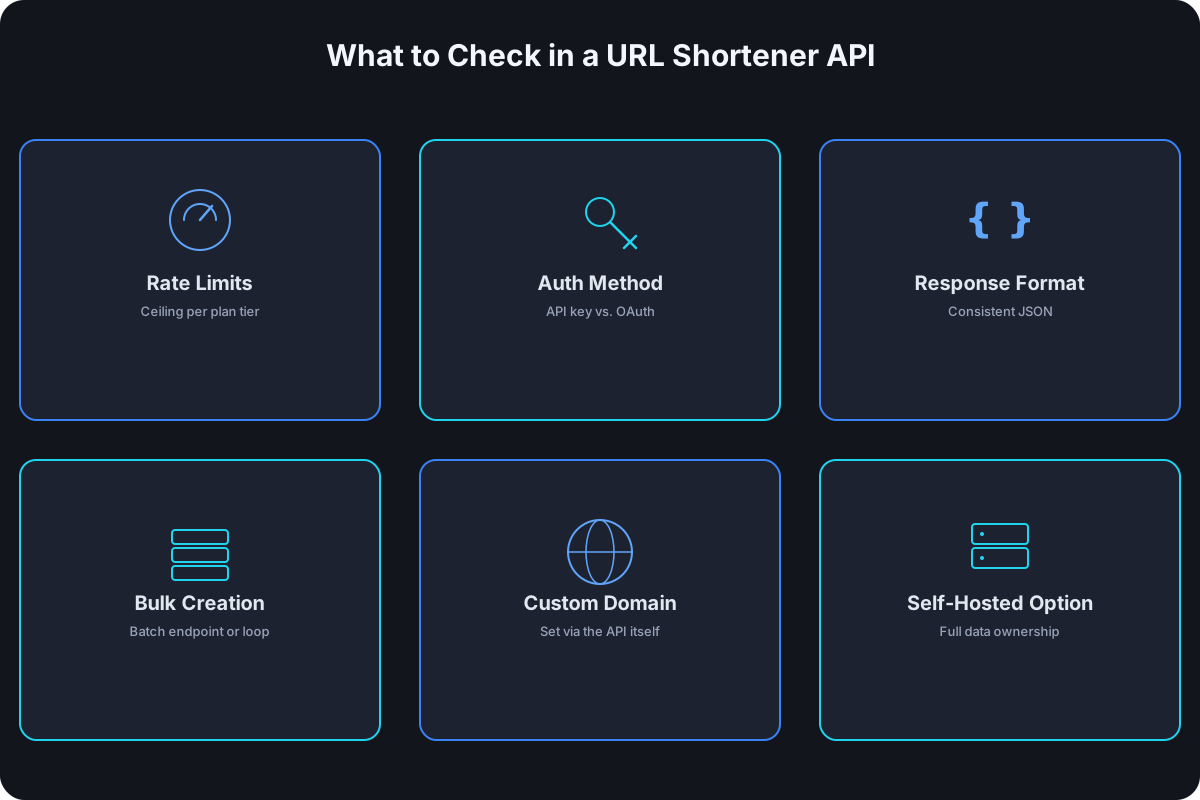
Six things determine whether an API is pleasant to build against or a source of production incidents:
- Rate limits, and how they scale with plan tier. A limit of a few requests per minute is fine for a marketing team creating campaign links by hand; it breaks instantly for a product feature that shortens a URL per user action. Check the ceiling on every tier you might actually pay for, not just the top one.
- Authentication method. A static API key is simpler to wire up than OAuth, but OAuth is usually necessary if you're building something that acts on behalf of multiple end users rather than a single account.
- Response format and consistency. JSON across every endpoint sounds like a given in 2026; it isn't always. Inconsistent field naming or undocumented response shape changes are a real cost when you're parsing responses in production code, not just testing in a browser.
- Bulk or batch creation. Some APIs only expose "create one link" and expect you to loop and rate-limit yourself; others have a dedicated batch endpoint built for the case. If you're generating hundreds or thousands of links at once, this difference is the whole ballgame.
- Custom domain support at the API level, not just in the dashboard. Plenty of shorteners let you attach a custom domain through the UI but don't expose domain selection as an API parameter — meaning every link your integration creates lands on their shared domain regardless of what you configured manually.
- A self-hosted option, for teams that can't send link and click data to a third party at all — regulated industries, internal tools, or just a strong preference for owning the infrastructure.
The APIs, Compared
| API | Auth | Bulk endpoint | Custom domain via API | Self-hosted option |
|---|---|---|---|---|
| Bitly | OAuth token | No — create one at a time | Yes, on paid tiers | No |
| TinyURL | API key | Limited | No | No |
| Rebrandly | API key | Yes | Yes | No |
| Short.io | API key | Yes | Yes | No |
| YOURLS (open source) | Self-managed key | Depends on plugins | N/A — you control the domain | Yes |
| Cut.bd | API key | CSV import (dashboard), Starter+ | Yes, from the Free plan | No |
Treat the pricing and exact limits behind each of these as a starting point, not gospel — providers change tiers often enough that the table above is about structure, not dollar figures. Verify current numbers on each provider's own pricing page before committing an integration to one.
Bitly
Bitly's API is mature and well-documented, which counts for a lot when you're integrating against unfamiliar docs at 11pm. The catch is volume: Bitly prices around link count more aggressively than most competitors — its free tier allows 5 links a month, and even the $199/month Premium plan caps at 3,000 links a month while remaining single-user. An integration that creates links per user action will hit that ceiling fast. See the full Cut.bd vs. Bitly breakdown if brand recognition is the main reason Bitly's on your shortlist.
TinyURL
TinyURL's API is about as minimal as this category gets — which is exactly its appeal for a quick script or a one-off integration that doesn't want to manage OAuth or think about response schemas. That simplicity comes at the cost of the features a production integration usually ends up wanting: no native custom-domain parameter, and bulk creation is limited enough that high-volume use cases outgrow it quickly. More in the Cut.bd vs. TinyURL comparison.
Rebrandly
Rebrandly built its API around multi-brand and multi-domain use cases from the start — if your product needs to attach different customers to different custom domains through the same integration, its domain-selection parameter is designed for exactly that. It's a reasonable pick specifically for that shape of problem. See the Cut.bd vs. Rebrandly comparison for where it fits more broadly.
Short.io
Short.io tends to be more generous with API access on its lower tiers than the bigger-name competitors, which makes it a common pick for smaller teams that want bulk creation and custom domains without an enterprise sales conversation. Full breakdown at Cut.bd vs. Short.io.
Self-Hosted: YOURLS and Similar
If sending click data to any third party is a non-starter — healthcare, finance, internal-only tooling — a self-hosted option like YOURLS removes that constraint entirely, at the cost of running and securing the infrastructure yourself. This is the right trade for a specific, real category of teams, and the wrong one for anyone who'd rather not own an ops burden for a URL shortener.
Cut.bd
Cut.bd's API includes custom domain support from the Free plan — not gated behind an Enterprise tier — with documented rate limits that scale from 3 requests/minute on Free up to 360 requests/minute on Ultimate, so you can see the ceiling on every tier before you build against it. Bulk creation is a CSV import in the dashboard rather than a separate public batch endpoint, available from the Starter plan up (Free doesn't include it); a fully programmatic high-volume integration means looping the same single-link create endpoint everyone else's link creation goes through, paced to the rate limit. Every link created through the API gets the same Base62-encoded short code and click analytics as one created through the dashboard — no separate code path or feature gap between the two.
How to Actually Decide
Work backward from your integration's shape, not the provider's brand recognition:
- Estimate real volume, including growth, and eliminate any API whose free or affordable tier can't cover it. Bitly's 5-link free tier eliminates it for most product integrations before any other criterion matters.
- Check whether custom domain is an API parameter or a dashboard-only setting. If your product needs per-customer branded domains, this alone eliminates TinyURL.
- Decide if bulk creation is a real requirement or a nice-to-have. If you're generating links one at a time in response to user actions, a missing batch endpoint matters less than it looks like it should.
- Rule out third-party data sharing if you have a hard compliance requirement — that's the only scenario where a self-hosted option is worth the operational cost.
- Read the actual rate limit table for the tier you'll realistically pay for, not the top tier used in marketing copy.
Frequently Asked Questions
Is there a genuinely free URL shortener API for production use? Depends on your volume. Bitly's free tier (5 links/month) isn't viable for most integrations; Cut.bd's free tier (30 links/month, API access included) covers small products and prototypes; Short.io and Rebrandly both offer usable free API access at low volume.
Do I need OAuth, or is an API key enough? An API key is enough for a single-account integration — your product, your links. OAuth becomes necessary when your integration needs to create or manage links on behalf of many different end users' own accounts.
What happens if I outgrow my URL shortener API's rate limit? Most providers either throttle (return 429 responses until your window resets) or require a plan upgrade. Either way, check the documented limit for every tier you might grow into before you build the integration, not after it's already failing in production.
Should I self-host instead of using a hosted API? Only if you have a specific reason to — a compliance requirement, a strong preference for data ownership, or a need to fully customize behavior the hosted APIs don't expose. For everything else, the operational cost of running your own shortener outweighs the control it buys you.
This comparison is one piece of a larger picture — see our complete URL shortener API guide for the full walkthrough, from core endpoints and auth through redirect mechanics and build-your-own.
Where Cut.bd Fits
If your integration needs custom domains and predictable rate limits without an Enterprise sales call, Cut.bd's API is built around that combination — full documentation and rate limit tables are on the API reference page. For genuinely high-volume programmatic creation specifically, the batch endpoint guide covers what's actually available today versus what you'd need to build yourself.
Found this useful? Share it.
Try Cut.bd's link shortener — free, no account required.
Shorten a link