UTM Builder Tools Compared: Free vs Paid
Search "free UTM builder" and the answer is almost always some version of Google's own Campaign URL Builder — a form, five fields, a generated URL, no account required. It's genuinely useful and genuinely limited in ways that only show up once you're tagging more than a handful of links. The paid alternative isn't really "the same tool with a price tag" — it's usually solving a different problem entirely, which is the actual thing worth understanding before deciding you need to pay for one. This assumes you already know what the five UTM parameters actually do — start there first if the fields themselves are still unfamiliar.
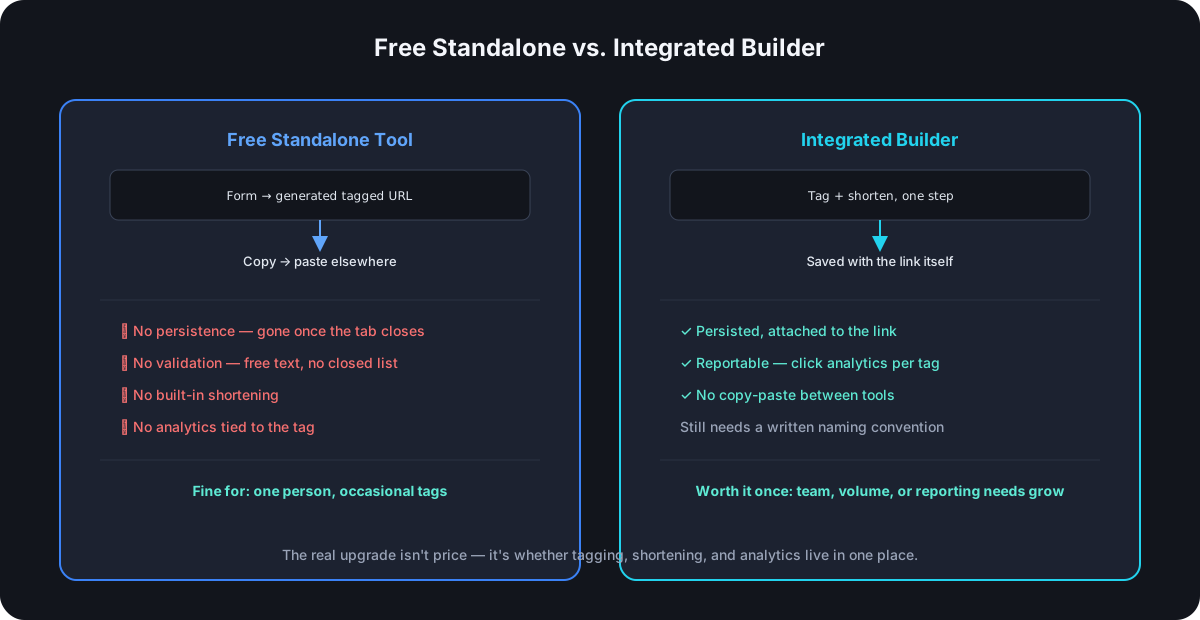
What a Free Standalone Builder Actually Gives You
A tool like Google's Campaign URL Builder does exactly one thing: takes five fields (utm_source, utm_medium, utm_campaign, utm_term, utm_content) and a destination URL, and outputs a single tagged URL you copy and use. No account, no setup, no cost. For a single marketer tagging an occasional link, that's the entire job done in under a minute.
What It Quietly Doesn't Do
Three gaps show up the moment volume or team size grows past "one person, occasionally":
No persistence. Close the tab and the tagged URL exists only wherever you pasted it — there's no record anywhere of what you tagged last month, or whether utm_campaign=summer-sale was already used for something else.
No validation. A naming convention only holds if something enforces it, and a free-text form field enforces nothing — Instagram, instagram, and IG are all equally valid inputs to the tool, which means the tool itself does nothing to prevent the exact inconsistency a convention exists to avoid.
No connection to shortening or analytics. The output is a long, ugly, fully-tagged URL — genuinely useful for pasting into an ad platform's destination field, but a completely separate step from shortening it for anywhere the raw length matters, and a completely separate tool again for actually seeing how that specific tagged link performed.
What an Integrated Builder Actually Adds
The meaningful upgrade isn't "the same form, but you paid for it" — it's that tagging stops being an isolated, disconnected step:
- Every tag gets saved somewhere, attached to the link it was created for, instead of existing only in whatever URL string you happened to paste it into.
- Tagging and shortening happen in the same action — no copying a long tagged URL out of one tool and into a second one to shorten it.
- Analytics report back against the same UTM values you tagged with, on the same link, instead of requiring you to cross-reference a separate analytics dashboard against a spreadsheet of what you tagged when.
The Real Trade-off Isn't Free vs. Paid
A paid UTM builder that's still a standalone tool — generating a tagged URL you then paste somewhere else — hasn't actually solved the disconnection problem, just charged for the same disconnected workflow. The meaningful line isn't price; it's whether tagging, shortening, and analytics live in one place or three. That integration usually happens to live behind a paid product because it requires more infrastructure than a stateless form does, but the price itself isn't what you're actually paying for — the elimination of the copy-paste-reconcile cycle is.
When the Free Standalone Tool Is Genuinely Enough
Worth saying plainly: if you're tagging a handful of links a month, working alone, and pasting the tagged URL directly into a platform that doesn't need it shortened (many ad platforms don't), a free standalone builder does the whole job with nothing missing. The gaps above only cost something once there's a team to stay consistent across, a volume high enough that manual tracking becomes unreliable, or a real need to see performance data tied directly back to the tag.
A Technical Detail Worth Knowing Either Way
Whichever builder you use, check what happens if the destination page's own URL already contains UTM parameters — some redirect-time systems merge or override them, others don't, and the difference matters if your CMS or landing page tool auto-appends its own tracking tags. It's a small detail that only surfaces as a bug report once two systems are both trying to own the same query string.
Frequently Asked Questions
Is a free UTM builder less accurate than a paid one? No — the generated URL is identical either way; UTM tagging is just query-string construction, not something a paid tool does more "correctly." The difference is entirely in what happens before and after that one URL gets generated.
Do I need a paid tool just because my team is more than one person? Not automatically, but the coordination problem gets real fast — multiple people using a free, stateless tool with no shared record is exactly the setup naming-convention drift happens in, so team size is a reasonable trigger to at least evaluate the alternative.
Can I build my own internal UTM builder instead of paying for one? Yes, and plenty of teams do — a shared spreadsheet with a dropdown-validated template solves the "no persistence, no validation" gaps without a new tool, though it still leaves the shortening and analytics disconnection unsolved.
Does an integrated builder replace the need for a naming convention? No — it removes the reason typos and casing drift can't be caught, but the actual rules (what's canonical, what's closed-list) still have to be decided and written down somewhere; the tool enforces consistency, it doesn't invent the convention for you.
Where Cut.bd Fits
Cut.bd's UTM builder lives in the link editor itself — the tag is stored with the link, not just baked into a static URL string, so it's editable after the fact and reportable against directly: click analytics break down by source, medium, and campaign per link, no separate spreadsheet required. If a destination URL already carries its own UTM parameters, Cut.bd's values take priority at redirect time rather than silently conflicting with whatever the destination page already had — worth knowing if your landing pages auto-tag themselves. The fields are free text rather than closed dropdowns today, so a written naming convention is still the right companion to this rather than something the tool replaces outright.
Found this useful? Share it.
Try Cut.bd's link shortener — free, no account required.
Shorten a link