Best Link-in-Bio Tools Compared (Linktree Alternatives)
Linktree defined the link-in-bio category well enough that its name gets used generically, the way "Google it" outgrew the search engine. That doesn't make it the automatic right choice for everyone reaching for one link slot on Instagram or TikTok — especially if you're already paying for a URL shortener with real click analytics, and a bio page would just be a second, disconnected tool tracking a second, disconnected set of numbers.
What to Actually Evaluate
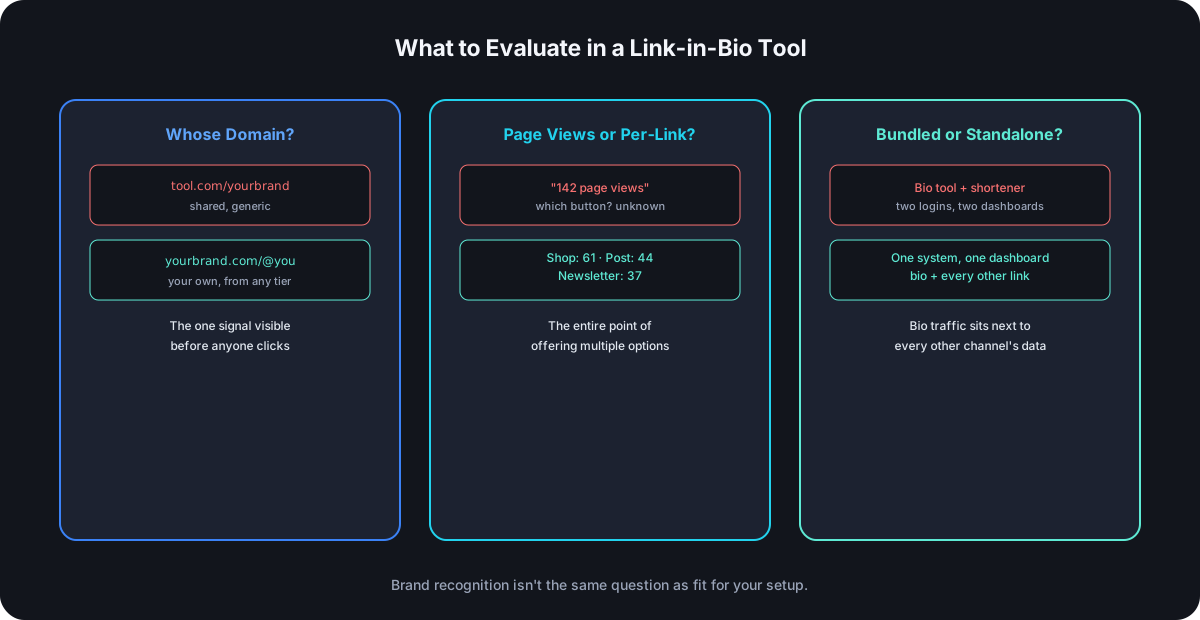
Four things separate a bio-link tool that quietly costs you data and branding from one that doesn't:
- Custom domain support, not just custom slugs. A shared subdomain (
linktr.ee/yourbrand) is a visible, permanent reminder of which tool you're using, sitting on the one link slot your entire audience sees. Whether your own domain is a default feature or a paid add-on matters more than almost anything else on this list. - Per-link analytics, not just a page view count. Knowing the bio page got visited tells you nothing about which specific button actually got clicked — that requires tracking at the link level, the same way a real URL shortener does.
- Bundled versus standalone. A bio page and the tracked short links on it can live in one system or in two completely separate ones — one more login and one more dashboard to reconcile is a real, recurring cost that compounds every time you actually want to check performance.
- Design flexibility that doesn't require a paid theme marketplace for anything beyond the absolute basics.
The Category, Broadly
Linktree is the default most people reach for first, largely on brand recognition — a mature, well-known product with a large plugin/app ecosystem, though its free tier defaults to the shared linktr.ee subdomain, with a custom domain typically living behind a paid plan.
Beacons leans hard into creator monetization — storefronts, media kits, tip jars — which is genuinely useful if that's the actual job, and unnecessary complexity if it isn't.
Social-scheduling-bundled bio tools (the kind that ship as an add-on inside a broader social media management platform) trade standalone flexibility for being one more feature inside a tool you might already be paying for anyway — worth checking if you're already using one of those platforms before adding a dedicated bio tool on top.
Exact pricing and feature gates shift often enough across this category that they're worth verifying directly on each provider's current pricing page rather than trusting any comparison — including this one — as a permanent snapshot.
The Detail Most Comparisons Skip: Whose Domain Is It
A bio link on a shared, generic domain reads as a tool choice, not a brand statement — visible to literally everyone who taps your profile. The same trust mechanics that make a branded short link outperform a generic one apply directly here, and it's worth checking specifically whether your own domain is included by default or something you have to add and pay for separately, since that gate varies a lot across this category and is easy to miss until you've already built out a page on the wrong plan.
Why Bundled Beats Standalone for Most Real Setups
A standalone bio tool, however good its own dashboard is, only ever shows you what happened on the bio page — it can't tell you how a bio-page click compares to the same product's performance from an email campaign or a paid ad, because that data lives somewhere else entirely. A bio page built from the same tracked links as everything else you're sharing rolls all of that into one place: the bio slot is just one more channel showing up in the same click data as every other one, not a second reporting system to cross-reference by hand.
Structure, Not Just a Flat List of Buttons
A page with six or more links benefits from something a lot of tools skip: the ability to group related links under a heading, or separate sections visually, instead of one undifferentiated stack of identical-looking buttons. It's a small thing until a bio page grows past three or four items, at which point "shop," "latest post," and "contact" all competing for equal visual weight in one flat list gets harder to scan than a page with even minimal structure — a heading here, a divider there — guiding the eye toward what actually matters most.
Frequently Asked Questions
Is Linktree bad, or just not always the default right answer? Not bad — mature and well-supported — but "most recognized" and "best fit for your setup" aren't the same question, especially once custom domain and unified analytics matter more to you than brand recognition alone.
Does switching link-in-bio tools break existing links people have bookmarked or saved? It can, if the bio page URL itself changes — worth checking whether a new tool lets you keep your existing custom domain and handle, or forces a new one, before migrating an audience that already has your current link saved somewhere.
Do I need per-link analytics if I only have three buttons on my bio page? Even at low volume, knowing which of three options actually gets chosen is the entire point of having multiple options in the first place — page-level views alone can't answer that.
Is a free link-in-bio tool ever the right permanent choice? For low-stakes, low-volume use, yes — the gaps (shared domain, limited analytics) matter progressively more as an audience and a brand grow, not on day one.
Where Cut.bd Fits
Cut.bd's bio pages are available on the default URL from Free and on your own domain from Starter, with four built-in themes, drag-to-reorder link/header/divider items, a draft toggle for hiding a page or individual links, and per-link click counts plus a page view count on the same analytics pipeline as every other tracked link in the account. Bio page allowances scale with plan (1 on Free and Starter, up to 20 on Ultimate), with per-link tracking on every tier and custom domains on Starter and higher.
Found this useful? Share it.
Try Cut.bd's link shortener — free, no account required.
Shorten a link