Link-in-Bio Tools vs URL Shorteners: The Difference
Instagram and TikTok both give you exactly one clickable link in your bio, and two very different tools compete for that slot: a link-in-bio tool and a URL shortener. They get confused constantly because both produce a short, tidy-looking link — but one of them is a landing page and the other is a redirect, and mixing them up leads to picking the wrong tool for what you're actually trying to do.
What a Link-in-Bio Tool Actually Does
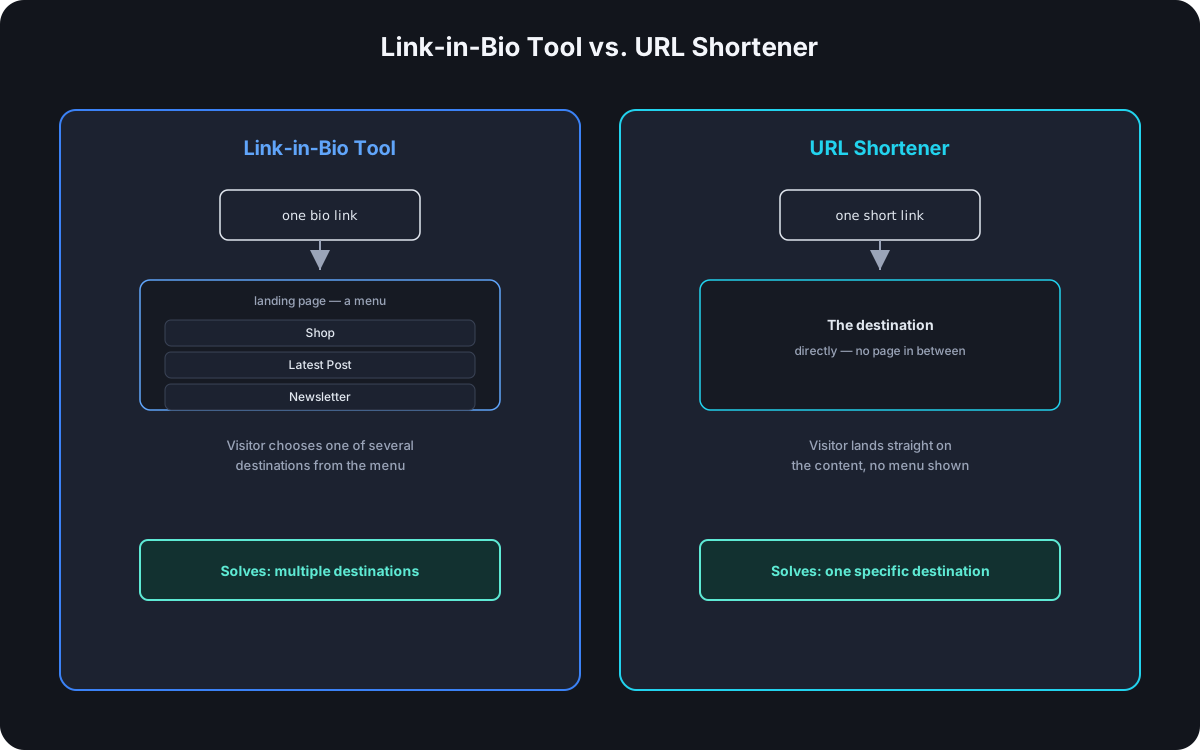
A link-in-bio tool solves the one-link constraint by turning that single slot into a small landing page — a menu of buttons, each pointing somewhere different: your shop, your latest post, a newsletter signup. Visiting the bio link doesn't take someone to a destination directly; it takes them to a page that then offers several destinations to choose from. Functionally, it's a lightweight website built for exactly one job.
What a URL Shortener Actually Does
A URL shortener does the opposite: it takes one long URL and compresses it into a short one that redirects straight to that single destination the moment it's clicked — no intermediate page, no menu, no choice to make. The entire mechanism is redirect-and-track, not present-and-choose.
The Actual Difference
| Link-in-Bio Tool | URL Shortener | |
|---|---|---|
| What it is | A small landing page | A redirect |
| Destinations per link | Several, presented as a menu | One |
| What a visitor sees first | A page with multiple options | The final destination directly |
| Typical placement | The single bio link slot | Anywhere a link is shared — bio, post, print, email |
Why People Confuse Them
Both occupy the same physical slot on a social profile, and both typically produce a short, branded-looking URL — bio.link/yourbrand and go.yourbrand.com/launch read as structurally identical at a glance. The difference only becomes obvious after the click: one lands on a page with choices, the other lands directly on content. From the outside, before clicking, they're genuinely indistinguishable, which is exactly why the two get treated as interchangeable when they're not.
When You Need One, the Other, or Both
- Just a URL shortener — when there's one specific destination that matters right now: a single product launch, a specific post, one campaign. A menu of options is friction the visitor doesn't need.
- Just a link-in-bio tool — rare in practice, since a bio page with no tracked links underneath means losing per-item click data entirely; most bio tools exist specifically to organize multiple destinations, not to replace tracking.
- Both together — the actual common setup: the bio slot hosts a link-in-bio page, and every button on that page is itself a shortened, tracked link. This gets the organizational benefit of a menu and the click-level analytics of individual short links, instead of choosing one benefit over the other.
Analytics: What Each One Actually Tracks
A link-in-bio page typically reports at the page level — total views, and a click count per button on the menu. A URL shortener reports at the link level — device, location, referrer, and timing, per individual destination. Used together, the combination covers both: the bio page tells you the menu is getting seen and which button gets chosen most, while the tracked short link behind each button tells you everything about who actually followed through on that specific choice.
Branding Considerations
The same domain-trust mechanics that make a branded short link outperform a generic one apply to a bio page too — a bio link on your own domain reads as more legitimate before the click than one on a shared, generic bio-tool domain, for the same reasons: it's the only signal available pre-click, and it borrows trust the brand already has instead of building it from nothing. Setting up a custom domain is the same process either way, whether it's fronting a single short link or a full bio page.
What a Combined Setup Actually Looks Like
A creator with a bio link, a shop, and a newsletter ends up with one bio page and three tracked links behind it:
go.yourbrand.com/bio          → the bio page itself
go.yourbrand.com/shop         → tracked link to the store
go.yourbrand.com/latest       → tracked link to the newest post
go.yourbrand.com/newsletter   → tracked link to the signup form
One bio slot, one page view metric for the whole thing, and three independent click counts underneath it — enough to tell not just "the bio link got visited" but specifically which of the three options people actually chose once they got there.
Frequently Asked Questions
Can a URL shortener replace a link-in-bio tool entirely? Only if there's genuinely one destination that matters — the moment there's more than one thing worth linking to from the same bio slot, a shortener alone can't present a menu the way a bio tool can.
Does a link-in-bio page need its own analytics, separate from the links on it? Page-level views are useful on their own — they tell you the bio link itself is getting visited — but the real value comes from the individual short links underneath having their own tracked, per-click analytics, not just an aggregate button-click count.
Is a link-in-bio page worse for SEO than a real website? It's a different question entirely — a bio page isn't meant to rank in search the way a website is; it's built for a single-purpose bio slot, not for organic discovery.
Should every button on a bio page be a shortened link? Yes, if per-button click tracking matters — a raw, unshortened URL on a bio page button works but gives up the analytics a tracked short link would provide for free.
Where Cut.bd Fits
Cut.bd's bio pages track a click count per link and a view count for the page itself, on the same analytics pipeline as regular short links — so a bio page and the tracked links on it aren't two disconnected tools to reconcile, just one system used two ways. See how QR codes and short links work together for extending the same setup to print and in-person placements.
Found this useful? Share it.
Try Cut.bd's link shortener — free, no account required.
Shorten a link