QR Codes + Short Links: A Marketer's Setup Guide
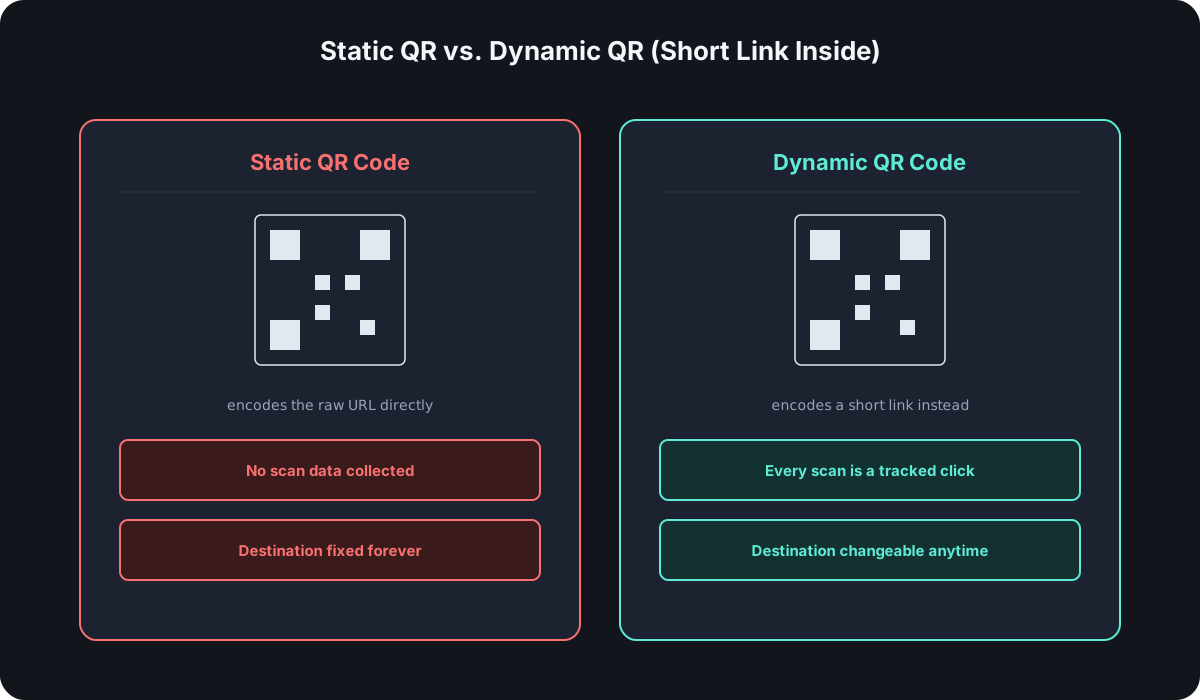
A QR code is just a visual encoding of whatever URL you give it — nothing more. Encode a raw destination URL and scanning it goes straight there, with zero data left behind. Encode a short link instead, and the exact same scan becomes a click event you can actually see: count, timing, device, location. Same code, same scan, completely different amount of information back to you.
Why Encode a Short Link Instead of the Raw URL
This is the entire decision, and it comes down to static versus dynamic:
- A static QR code has its destination baked directly into the code itself. It can't be tracked and can't be changed — if the URL needs to update after the code is already printed on ten thousand flyers, it can't.
- A dynamic QR code encodes a short link that you control, which then redirects to the real destination. Because the redirect happens through your shortener, every scan is a click your account sees, and the destination behind the short link can be changed at any time without touching the printed code at all.
For anything beyond a single throwaway use, dynamic — meaning a short link underneath — is the only version worth setting up.
How to Set One Up, Step by Step
- Create the short link first, with any UTM parameters or campaign tags the destination needs — this is the same short link you'd use anywhere else, the QR code is just another way to trigger it.
- Generate the QR code from that short link, not from the raw destination URL. Most shorteners generate this automatically the moment the link exists — there's rarely a reason to use a separate QR tool at all.
- Choose the right format for where it's going — a vector format (SVG) scales cleanly for large print like posters or packaging; a PNG at sufficient resolution is fine for smaller or digital-only placements.
- Test-scan it before it goes anywhere permanent. A phone camera catches most problems immediately — do this before a print run, not after.
- Watch scans in the same analytics as your other link clicks. A QR scan and a regular click are the same event type once the link is shortened; there's nothing separate to check.
Where QR Codes Actually Work — and Where They Don't
They earn their place anywhere a phone camera is already the natural next move: product packaging, posters, table tents, business cards, storefront windows, printed receipts. The person is already standing still, already holding their phone, and the code is the shortest path from curiosity to the destination.
They tend to fail anywhere that assumption breaks — a QR code on a highway billboard asks a driver to unlock their phone, open the camera, and hold steady, all while moving at speed; a QR code on a TV ad is gone before most viewers could scan it even if they wanted to. The format works when scanning is the easy option, not the hard one.
Print Considerations Marketers Get Wrong
- Sizing too small for the viewing distance. A common rule of thumb is that a QR code needs to be roughly one-tenth of its intended scanning distance — a code meant to be scanned from about a meter away needs to be roughly 10cm per side, not a thumbnail tucked in a corner.
- Not enough quiet zone. The plain white margin around a QR code isn't wasted space — scanners use it to detect where the code starts and stops, and cropping it too tight causes scan failures that have nothing to do with the code's actual content.
- Low contrast between the code and its background. A QR code printed in a light color on a similarly light background, or over a busy photo, can fail to scan even when it looks fine to a human eye.
- Skipping the test scan after final print production, not just on a screen proof — printed contrast and size can behave differently than they did on a monitor.
What Good QR Analytics Actually Show You
Once the code is scanning through a short link, the data is identical to any other link's analytics: scan count over time — did a poster campaign actually drive traffic, or did it die after week one — plus device and location breakdown, since QR scans skew mobile almost universally but location data tells you which physical placements are actually working. The ability to swap the destination after printing is the other half of the value: the code on the wall never has to change, only what it points to.
Frequently Asked Questions
Do I need a separate QR code tool if my shortener already generates them? No — if your shortener generates a QR code per link automatically, a separate tool just adds a second thing to keep in sync with no benefit.
What happens if I need to change the destination after printing? Nothing changes about the printed code — you update the short link's destination in your dashboard, and every future scan goes to the new destination immediately.
Does a QR code need its own analytics, separate from the short link? No — once it encodes a short link, a scan is just a click, tracked the same way any other click on that link would be.
How much smaller can I make a QR code for digital-only use versus print? Meaningfully smaller — the one-tenth-of-scanning-distance rule of thumb is really a print consideration for physical distance; on a screen, a QR code just needs to be large enough for a camera to focus on cleanly, which is a much lower bar.
Where Cut.bd Fits
Every Cut.bd link gets a downloadable QR code automatically, on every plan including Free, feeding into the same click analytics as the link itself. Pair it with a custom domain so the QR code's destination reads as your own brand rather than a generic shortener — see the QR code generator page for the full feature set, or the complete link-in-bio and branding guide for how this fits alongside the rest of a branded setup.
Found this useful? Share it.
Try Cut.bd's link shortener — free, no account required.
Shorten a link