Custom Domains for Branded Short Links: Setup Guide
A custom domain turns bit.ly/3xK9fQ2 into go.yourbrand.com/launch — the actual setup is a single DNS record and a few minutes of waiting, but knowing exactly which record, and where to put it, is the part that trips people up. This is that walkthrough, start to finish.
What You Need Before You Start
Three things, all of which you likely already have:
- A domain you control, or the ability to add a subdomain to one — you don't need a new domain purchase, just access to manage DNS for an existing one.
- Access to your DNS provider's dashboard — wherever your domain's nameservers point: Cloudflare, GoDaddy, Route 53, Namecheap, or similar.
- A shortener account that supports custom domains — check this before you start, since some plans gate custom domains behind a paid tier.
The DNS Setup, Step by Step
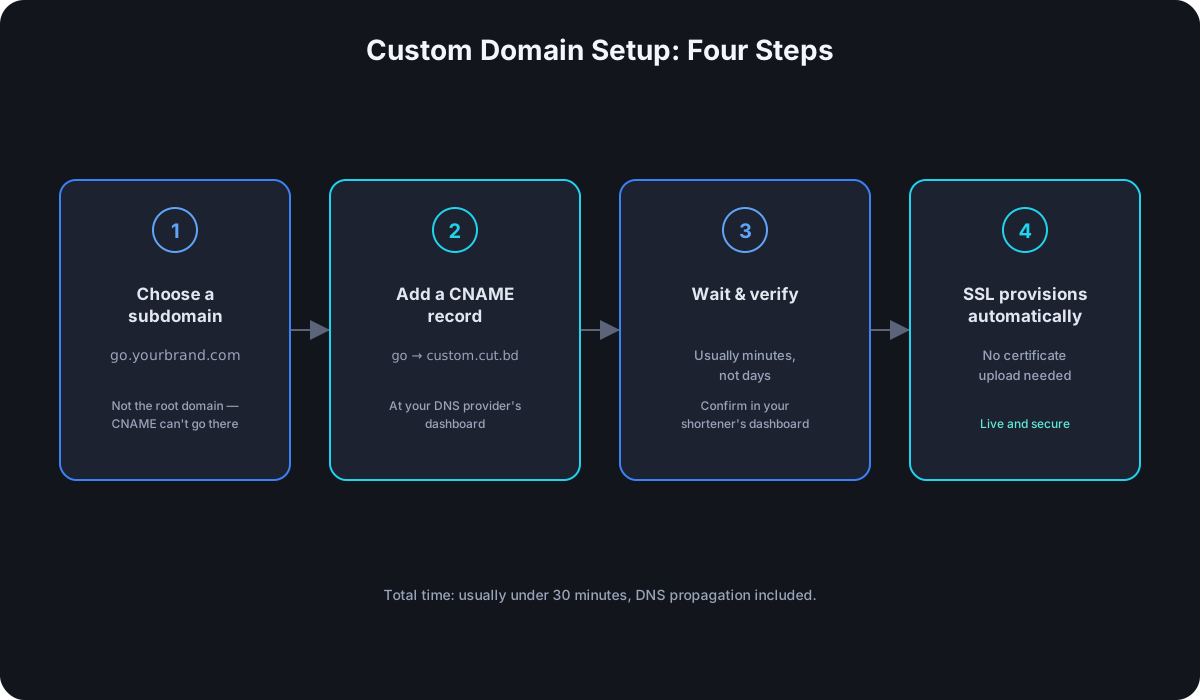
- Pick a subdomain, not your root domain.
go.yourbrand.comorlink.yourbrand.com, notyourbrand.comitself. This isn't just a style preference — a CNAME record, which is what custom domain setup requires, technically can't be added at the root of a domain under standard DNS rules. A subdomain sidesteps the limitation entirely and keeps your main website's DNS untouched. - Add a CNAME record in your DNS provider's dashboard, pointing your chosen subdomain at the hostname your shortener gives you (something like
custom.cut.bd). A CNAME record is just an alias — it tells DNS "requests for this subdomain should resolve wherever this other hostname points," which is exactly the redirect-the-redirect behavior a custom domain needs. - Wait for DNS propagation. Most providers update within minutes; the traditional "up to 48 hours" figure is a worst-case number for stale caches elsewhere on the internet, not the typical case.
- Verify the domain in your shortener's dashboard. This confirms the CNAME resolves correctly before anything goes live on it.
- SSL provisions automatically once verification passes, typically within a few minutes — most providers handle this with an automated certificate (commonly Let's Encrypt) rather than requiring you to upload anything yourself.
Choosing the Right Subdomain
go., link., and s. are the three most common prefixes, and any of them read as intentional rather than default. What matters more than the specific word is consistency — pick one and use it everywhere, so go.yourbrand.com becomes recognizable across every channel instead of forcing people to relearn it per campaign. A separate short domain entirely (yourbrand.link instead of a subdomain of your main site) is also a legitimate choice, and sometimes shorter — the setup steps are identical either way, just applied to a domain instead of a subdomain.
Common Setup Mistakes
- Using an A record instead of a CNAME. An A record points a name at a raw IP address, which breaks the moment the shortener's underlying infrastructure changes IPs — a CNAME points at a hostname instead, which stays correct even if the IP behind it changes.
- Trying to point the root domain directly. If you don't have an ALIAS/ANAME option in your DNS provider (Cloudflare and a few others offer CNAME flattening at the root; most don't), a root domain redirect needs a different approach entirely — which is the real reason to default to a subdomain instead of fighting this.
- Testing before SSL finishes provisioning. A browser certificate warning in the first few minutes after DNS verifies usually isn't a real problem — it's just SSL issuance still in progress. Wait a few minutes before assuming something's broken.
- A leftover conflicting record on the same subdomain. If that subdomain already has an existing A or CNAME record from a previous setup, it needs to be removed first — DNS providers won't let two conflicting records coexist on the same name.
What Changes Once It's Live
The redirect behavior is identical to a generic shortener domain — what changes is everything around it. A link on a domain people recognize reads as legitimate before they've even clicked it, which is why branded domains consistently outperform generic ones on click-through rate. It also means the domain itself becomes part of your brand's footprint across every channel a short link appears on — social bios, printed materials, email signatures — instead of teaching your audience to associate the click with someone else's brand.
Frequently Asked Questions
How long does a custom domain setup actually take? The DNS and verification steps typically take under 30 minutes total, including propagation. SSL provisioning adds a few more minutes on top once verification passes.
Can I use a subdomain I'm already using for something else? No — a subdomain can only point at one destination at a time. If go.yourbrand.com already hosts something, you'll need a different subdomain for the shortener.
Do I need to buy a new domain for this? No — a subdomain of a domain you already own is the standard approach and doesn't require any new purchase, just a DNS record.
What if my DNS provider doesn't support CNAME flattening and I really want my root domain? Use a subdomain instead — it's not a workaround, it's the standard, unrestricted way to do this regardless of which DNS provider you use.
Can I run more than one custom domain on the same account? Most shorteners that support custom domains at all support several — useful if you run multiple brands, or want to separate domains by campaign type (go.yourbrand.com for general links, promo.yourbrand.com for time-limited offers). Each domain goes through the same CNAME-and-verify setup independently; they don't interfere with each other.
Where Cut.bd Fits
Cut.bd includes a custom domain on the Free plan, with the verification and SSL steps above handled automatically once your CNAME record is in place — no separate certificate purchase or upload. If you're still deciding whether a custom domain is worth setting up versus a generic shortener domain, custom short URLs vs. generic shorteners covers that decision, including how the domain question and the alias question are separate choices worth weighing independently.
For how a custom domain fits into branding more broadly — including link-in-bio pages — see the complete link-in-bio and branding guide.
Found this useful? Share it.
Try Cut.bd's link shortener — free, no account required.
Shorten a link