How to Track Link Clicks Across Social Campaigns
Post the same link on Instagram, TikTok, and LinkedIn, and every click from all three platforms lands in your analytics as one undifferentiated number. To track link clicks by platform instead of just in aggregate, the destination has to stay the same but the link itself has to be different everywhere it appears — that one setup choice is the entire difference between "the campaign got clicks" and "the campaign got clicks from TikTok specifically."
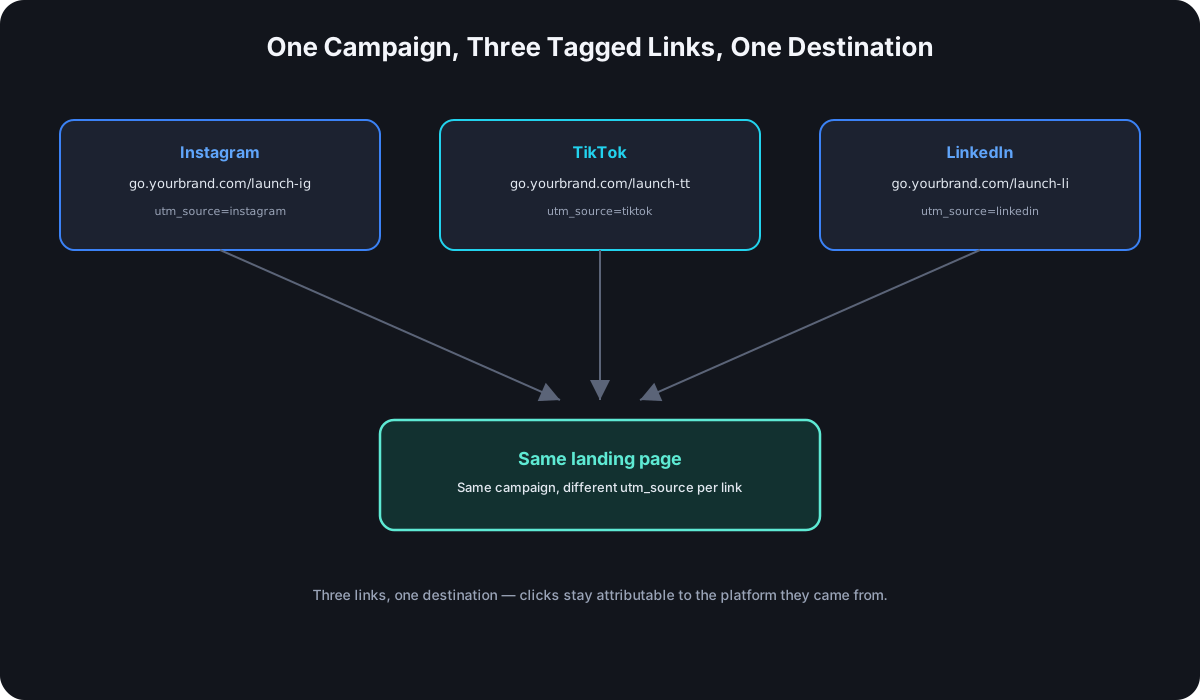
One Link Per Platform, Not One Link for Everything
The same destination page can — and should — be reached through a different link on every platform it's shared on. Same page, same content, different utm_source baked into each one. The moment two different platforms share the identical link, per-platform attribution is gone for both of them at once; there's no way to retroactively split "clicks from this one link" back into "clicks that came from Instagram" versus "clicks that came from LinkedIn."
Tagging Convention for Multi-Platform Campaigns
The pattern that scales cleanly across any number of platforms:
utm_source— the platform itself:instagram,tiktok,linkedin,facebook,twitter.utm_medium— kept consistent associalfor organic posts, split out aspaid-socialfor anything boosted or run as an ad, even on the same platform.utm_campaign— the same value across every platform, since this is what ties all the platform-specific links back together as one campaign in reporting.utm_content— used when the same platform carries more than one placement worth distinguishing: a bio link versus a story link on Instagram, for instance.
That's the UTM naming convention applied to a specific, common case — one campaign, several platforms, each platform getting its own fully tagged, then shortened, link.
Where to Put the Link on Each Platform
Placement constraints vary enough per platform that the same campaign often needs different link formats, not just different tags:
- Instagram — feed post captions don't support clickable links at all; the bio link and story link stickers are the actual placements that matter.
- TikTok — same constraint as Instagram; the bio link is close to the only reliable clickable placement outside of ads.
- LinkedIn and Facebook — both support a direct clickable link in the post itself, which simplifies things — the tagged, shortened link just goes straight in the caption.
- X/Twitter — links in the post body work directly, same as LinkedIn and Facebook.
Reading the Results
Once each platform has its own link, the analytics answer the actual question a multi-platform campaign needs answered: which platform drove the most clicks, not just how many clicks happened somewhere. Device and location data layer on top of that per platform — useful for noticing, for instance, that LinkedIn clicks skew desktop while TikTok clicks are almost entirely mobile, which is a real, actionable difference in how each platform's audience engages rather than a data quirk to ignore.
Common Mistakes That Break Cross-Platform Tracking
- Reusing the exact same short link everywhere. This is the single most common way cross-platform tracking silently fails — it still looks like tracking is working, since clicks are being counted, just not attributable to any one platform.
- Inconsistent
utm_sourcenaming across platforms or over time —Instagramone month andinstagramthe next splits what should be one row into two in every report that uses it. - Not separating organic from paid on the same platform. An Instagram post and an Instagram ad sharing
utm_source=instagramwith noutm_mediumdistinction makes it impossible to tell how much of that platform's performance was paid reach versus organic.
A Practical Setup for a Real Campaign
A product launch shared across three platforms ends up as three distinct tagged, shortened links, all pointing at the same landing page:
go.yourbrand.com/launch-ig
  → utm_source=instagram&utm_medium=social&utm_campaign=product-launch-2026

go.yourbrand.com/launch-tt
  → utm_source=tiktok&utm_medium=social&utm_campaign=product-launch-2026

go.yourbrand.com/launch-li
  → utm_source=linkedin&utm_medium=social&utm_campaign=product-launch-2026
Three custom aliases, three tag sets, one shared campaign name tying them together — and three separate click counts to compare once the campaign is live, instead of one number with no way to tell where it came from.
Frequently Asked Questions
Do I need a separate link for every single post, or just every platform? Every platform at minimum; every individual post if you want to compare specific posts against each other rather than just platforms as a whole — that's what utm_content is for.
What if I'm sharing the same link organically and also boosting it as an ad? Tag them differently even on the same platform — same utm_source, different utm_medium (social versus paid-social) so paid and organic performance don't blend into one number.
Does this work the same way for stories and bio links on the same platform? Yes — give each placement its own utm_content value if you want to know whether the story sticker or the bio link actually drove the click, since both can coexist in the same campaign.
How many platform-specific links is too many to manage? Rarely a real limit — the constraint is usually naming discipline, not volume. A shortener with custom aliases and a UTM builder keeps a dozen campaign links as manageable as three.
What if my Instagram or TikTok bio only fits one link? That's the actual reason link-in-bio tools exist — a single bio link that expands into a small menu of destinations, each of which can still carry its own tagged, tracked short link underneath. The bio slot stays singular; the tracking doesn't have to.
Where Cut.bd Fits
Cut.bd's UTM builder and custom aliases make a multi-platform setup like the one above fast to create consistently — tag once per platform, get a clean branded link back, and every platform's clicks show up separately in the same dashboard. Pairing this with QR codes extends the same per-placement tracking to print and in-person touchpoints too.
Found this useful? Share it.
Try Cut.bd's link shortener — free, no account required.
Shorten a link