Bulk URL Shortening via API: Batch Endpoint Guide
"Does it have bulk creation?" gets asked constantly when evaluating a URL shortener API, and the honest answer is often more nuanced than a yes-or-no comparison table suggests. Some providers expose a real batch endpoint — one request, many links created. Others offer bulk creation only as a CSV upload in the dashboard, which solves a completely different problem than a scriptable integration needs. Knowing which one you're actually getting, before you build against it, saves a rebuild later.
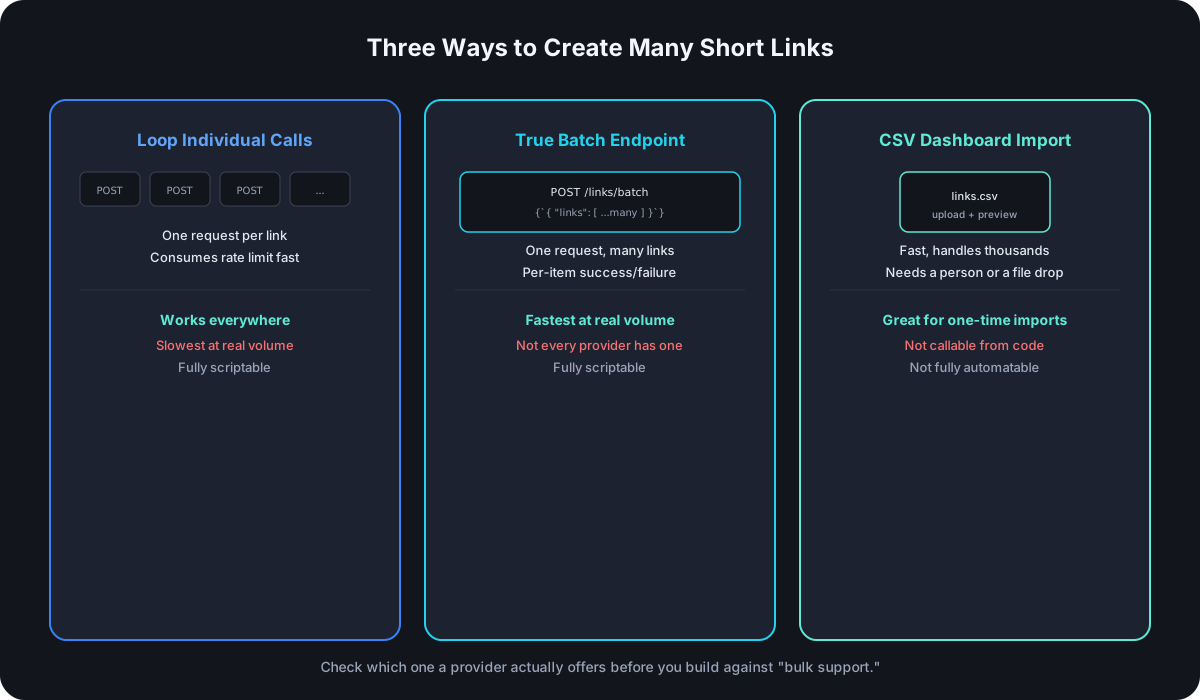
What a Real Batch Endpoint Actually Does
A genuine batch endpoint accepts an array of link definitions in a single request and creates all of them server-side in one pass, instead of your integration making one request per link:
POST /links/batch

{
  "links": [
    { "destinationUrl": "https://example.com/a", "customSlug": "prod-a" },
    { "destinationUrl": "https://example.com/b", "customSlug": "prod-b" },
    { "destinationUrl": "not-a-valid-url" }
  ]
}
The response format is what separates a well-designed batch endpoint from a poorly-designed one: partial success. A thousand-item batch where three entries have malformed URLs shouldn't fail all 997 good ones along with them — it should create everything valid and report exactly which entries failed and why:
{
  "results": [
    { "ok": true, "link": { "id": "lnk_a1", "shortUrl": "cut.bd/prod-a" } },
    { "ok": true, "link": { "id": "lnk_b2", "shortUrl": "cut.bd/prod-b" } },
    { "ok": false, "error": "Invalid URL", "destinationUrl": "not-a-valid-url" }
  ]
}
That shape lets a caller create everything that's valid immediately and retry only the failed rows, instead of treating the whole batch as atomic and losing the 997 successes to fix the 3 failures.
Why This Beats Looping, When It Exists
The advantage isn't just fewer lines of code — it's rate-limit economics. If your API caps you at 60 requests a minute and you need to create 5,000 links, looping individual creates means roughly 84 minutes of API traffic even running at the ceiling continuously. A batch endpoint that accepts a few hundred links per call turns that into a handful of requests, most of your rate-limit allowance freed up for everything else your integration also needs to do in the same window.
The CSV Dashboard Import Alternative
A lot of providers — Cut.bd included — solve "create a lot of links at once" with a CSV upload feature in the dashboard rather than a callable batch API endpoint. You paste a list of URLs or upload a file, the system validates and previews it, then creates everything in one go with the same partial-success behavior described above: rows that succeed are created immediately, and a failed row doesn't roll back the successful ones around it.
That's a genuinely good solution for a one-time or occasional bulk task — migrating a spreadsheet of existing links, a marketing team importing a season's worth of campaign URLs before launch. It's a different tool than a batch API endpoint for one specific reason: it requires a human in the loop, or at minimum a scheduled file-drop process. If your actual need is "my code creates 200 links every night as part of an automated pipeline," a dashboard upload — however well built — isn't the mechanism for that; it's built around a person clicking through a preview step, not a script calling an endpoint unattended.
If There's No Batch Endpoint: Looping Correctly
When bulk creation is dashboard-only and your use case is genuinely automated, the fallback is pacing individual create calls under the documented rate limit rather than waiting to get throttled:
- Throttle proactively, using the rate-limit response headers to pace requests rather than firing as fast as possible and handling
429s reactively. - Treat each creation independently. A failure on link #340 shouldn't stop the loop — log it, continue, and retry the specific failures at the end rather than the whole batch.
- Use an idempotency check if the API doesn't provide one natively — before creating a link, check whether one with the same destination and alias already exists, so a retried request after a timeout doesn't create a duplicate.
- Batch your own logging, not just your requests. A thousand-link import that fails silently on item #12 and keeps going is only debuggable if you're actually recording which specific items failed and why.
How to Actually Check Before You Build
Comparison tables and marketing copy both tend to blur "has bulk creation" into a single checkmark. Before committing an integration to a provider, check specifically:
- Is there a documented request/response shape for a batch endpoint, not just a mention of "bulk support" in a features list?
- Does bulk creation require the dashboard, or is it callable from your own code with an API key?
- What does the response look like when some items succeed and others fail — atomic all-or-nothing, or partial success with per-item results?
- What's the actual size limit per batch or per import, and does it scale with plan tier the way rate limits typically do?
Frequently Asked Questions
Is a CSV dashboard import "bulk creation via API"? Not in the sense most developers mean when they ask the question — it solves the same underlying problem (many links, one action) but isn't callable from your own code, which matters if the whole point is automation.
Should a batch endpoint be all-or-nothing or partial success? Partial success, in almost every real-world case — an all-or-nothing batch means one malformed entry among a thousand blocks everything, which is rarely the behavior anyone actually wants once they hit it in practice.
Does batching help if I'm only creating a handful of links? Not meaningfully — the rate-limit and request-count savings only matter at real volume. For occasional, small-batch creation, looping individual calls is simpler to build and the difference is invisible.
What's a reasonable batch size limit for an API to enforce? Large enough to matter (hundreds, not tens) but small enough that a single request can't time out or fail unrecoverably — most real-world batch endpoints cap somewhere in the low thousands per call and expect multiple calls for anything larger.
Where Cut.bd Fits
Cut.bd's bulk creation is a CSV import in the dashboard (My Links → Import) rather than a separate batch REST endpoint — paste a list or upload a CSV with destinationUrl, customSlug, title, and tags columns, and it creates everything in one pass with the same partial-success behavior described above: successful rows go live immediately, failed rows can be fixed and re-uploaded without touching what already worked. It's available from the Starter plan up, scaling from 50 links a month on Starter to 5,000 a month on Ultimate — Free doesn't include it. For a fully automated, code-driven pipeline instead of an occasional dashboard import, the path today is the same single-link create endpoint every other integration uses, looped and paced to your plan's documented rate limit — or see API key setup if you're starting that integration from scratch.
Found this useful? Share it.
Try Cut.bd's link shortener — free, no account required.
Shorten a link