How Agencies Should Choose a URL Shortener
An agency isn't picking a URL shortener for one brand — it's picking one that has to work correctly for every client at once, without their links, domains, or analytics bleeding into each other. That's a structurally different requirement than what a single-brand team plan is built for, and it's worth evaluating separately rather than assuming a good team tool automatically scales to agency use.
What Makes Agency Needs Different
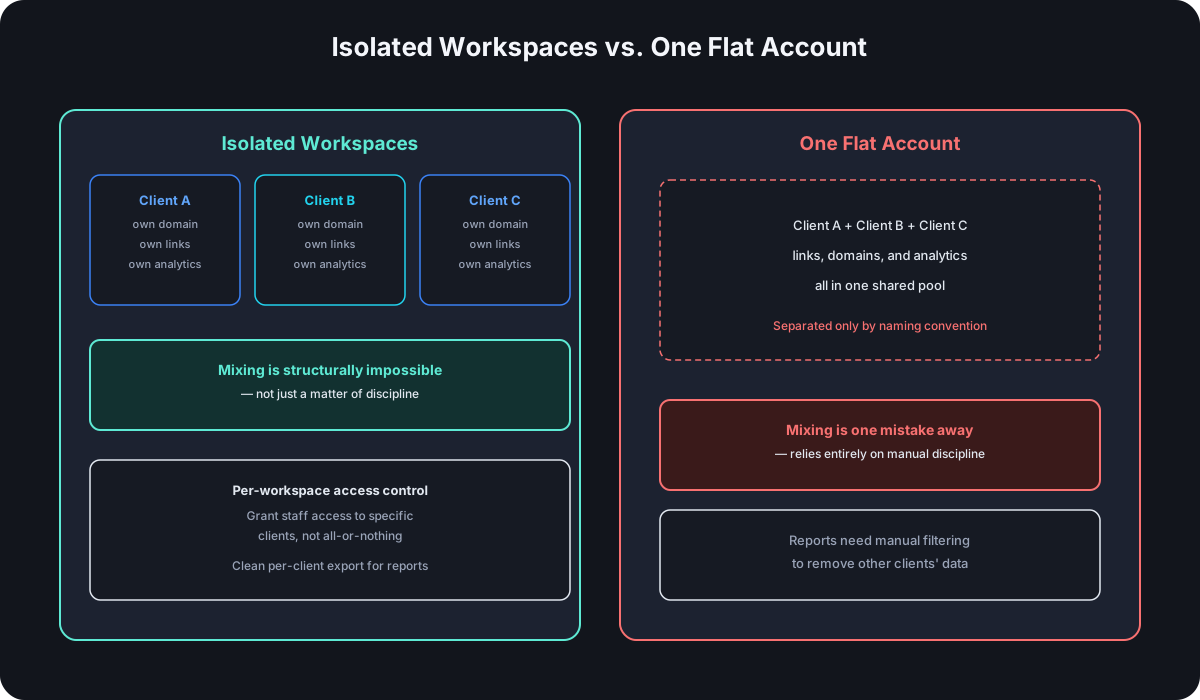
A typical team plan assumes one brand, one domain, one pool of links and analytics shared across the people using it. An agency needs the opposite: several clients, each with their own brand and domain, whose links and click data should never mix — both for accuracy and because handing Client A visibility into Client B's numbers is a real trust problem, not just a cosmetic one.
Workspace Separation Is the Core Requirement
The actual feature this requires is workspace-level isolation — each client gets their own contained space for links, domains, and analytics, rather than everything living in one flat account distinguished only by naming convention or folder structure. Without real separation, the failure modes are specific and avoidable: a link created under the wrong client context, an export that accidentally includes another client's data, or analytics that require manual filtering to make sense of. A flat account can be made to work with enough discipline, but workspace separation removes the discipline requirement entirely by making cross-client mixing structurally impossible rather than just against policy.
Custom Domains Per Client
The same reasons a branded domain outperforms a generic one apply per client, not just to the agency itself — a client's audience should see that client's domain on shared links, not the agency's. That means the shortener needs to support multiple custom domains under one account, each tied to its own client workspace, rather than a single custom domain shared across everyone the agency serves. Setting up any individual domain is the same DNS process either way; the requirement specific to agencies is being able to do it repeatedly, per client, without hitting a one-domain-per-account ceiling.
Client Reporting Considerations
Whatever report an agency hands back to a client needs to be pullable cleanly, without manual cross-referencing to strip out other clients' data first. That means real per-workspace export — click data, link performance, whatever the report format needs — scoped automatically to the one client it's for. A tool that only exports account-wide data turns every report into a manual filtering exercise, which is exactly the kind of recurring operational cost that erodes the value of using a shortener at all.
Billing and Seat Structure for Agencies
This is the detail agencies most often get wrong when evaluating: seat-based pricing usually scales with how many people use the tool, not how many clients the agency serves — and those are different numbers. A five-person agency with twenty clients has low seat count and high workspace count, which is a different cost shape than typical seat-based pricing assumes. Confirm specifically whether pricing scales per client workspace, per seat, or both, before assuming a plan sized for team headcount actually covers agency client volume.
Team Access Within a Client Workspace
Agency staffing rarely maps one-to-one with clients — an account manager might touch five client workspaces, while a designer only needs access to the two they're actively working on. Workspace-level access control matters here as much as workspace-level data separation: the ability to grant a specific person access to specific client workspaces, rather than an all-or-nothing choice between "full account access" and "no access at all." Without that granularity, agencies end up either over-granting access (everyone can see every client, undermining the isolation workspaces are meant to provide) or under-granting it (constantly re-adding people to workspaces as project assignments shift).
What to Ask Before Choosing
- Does the platform support genuinely isolated workspaces per client, not just naming conventions within one account?
- Can each client workspace have its own custom domain, and is there a real limit on how many?
- Does reporting export cleanly per client, without manual filtering?
- Does pricing scale with client count, seat count, or both — and which one actually matches how the agency grows?
- What happens to a client's links and data if that client relationship ends — can their workspace be cleanly offboarded?
Frequently Asked Questions
Can an agency just use separate accounts per client instead of one account with workspaces? Technically yes, but it multiplies login management, billing, and reporting overhead by the number of clients — workspace separation within one account solves the same isolation problem without that overhead.
Should each client have their own login, or should the agency manage everything? Depends on the client relationship — some clients want visibility into their own workspace directly; others are happy with the agency handling everything and delivering reports. A platform with workspace-level permissions supports both without forcing one model.
Is a custom domain worth it for every single client, even small ones? Usually yes if the link is client-facing at all — the branding and trust benefit applies regardless of client size, and the setup cost per domain is small and fixed.
What happens to reporting history if a client workspace gets deleted? This varies by platform and is worth confirming before it matters — ask specifically whether historical data is retained, exportable before deletion, or lost immediately, since that affects what an agency can hand a client on offboarding.
Where Cut.bd Fits
Cut.bd's workspaces support genuinely separate client spaces within one account, each capable of its own custom domain and isolated analytics — the structural separation this guide is about, not just a naming convention. See the complete guide to Bitly alternatives for how Cut.bd compares more broadly, and confirm current per-workspace pricing directly for agency-specific volume.
Found this useful? Share it.
Try Cut.bd's link shortener — free, no account required.
Shorten a link