URL Shortener vs Deep Link: What's the Difference
URL shortener and deep link get used almost interchangeably in casual conversation, because both are URLs, both show up in the same marketing and product contexts, and both are things a link in a text message or social post might use. They solve genuinely different problems, though, and understanding the difference matters the moment you need a link to actually open an app to a specific screen instead of just landing somewhere in a browser.
What a URL Shortener Actually Does
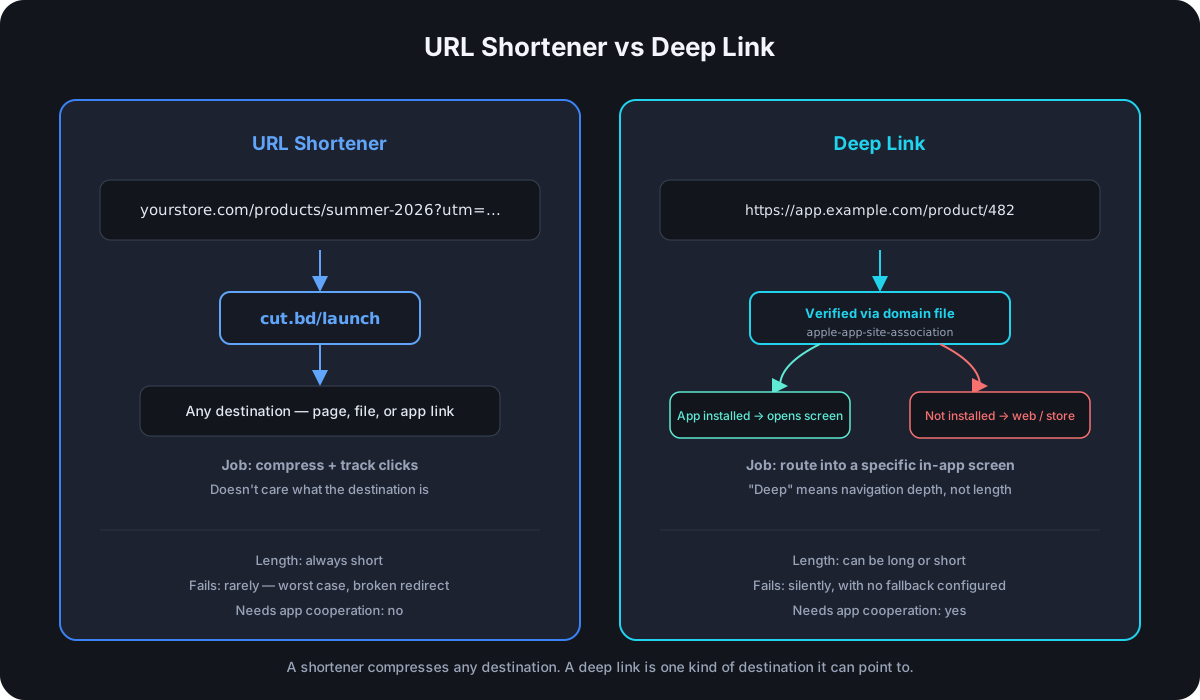
A URL shortener maps a short code to a destination URL and redirects anyone who clicks it — that's the entire mechanism, and it works identically regardless of what the destination actually is: a blog post, a product page, a PDF, or an app deep link itself. The shortener doesn't know or care what kind of content it's pointing at. Its job is compression, branding, and — because every click has to ask the shortener's server where to go — click analytics that a raw link never provides.
What a Deep Link Actually Does
A deep link is a URL built to route into a specific location inside a mobile app — a particular product page, a user's profile, an item in a cart — rather than just launching the app to its default home screen. That's a completely different problem than compression: a deep link can be long or short, the "deep" refers to how far into the app's internal navigation it goes, not the length of the string itself.
There are two technical approaches in real use:
Custom URI schemes (myapp://product/482) are the older method. They work only if the app is already installed and the OS has registered the scheme — tapping one with the app absent typically fails silently or shows an error, with no automatic fallback to anything useful.
Universal Links (iOS) and App Links (Android) fixed that gap. Both use ordinary https:// URLs instead of a custom scheme, verified through a small file hosted on the domain itself (apple-app-site-association for iOS, assetlinks.json for Android) that proves the domain and the app belong to the same developer. When the app is installed, tapping the link opens it directly to the linked content. When it isn't, the same link falls back to a normal web page or an app store listing — the technique usually called deferred deep linking, since the destination is deferred until the OS knows whether the app exists on that device.
Where They Actually Overlap
The two aren't mutually exclusive, and the overlap is where most of the real confusion comes from. A shortened link's destination can be a deep link — cut.bd/app redirecting to a Universal Link is a completely normal setup, and the shortener doesn't need to know or care that the URL it's redirecting to happens to open an app instead of a browser tab.
The more useful overlap goes further than that: a shortener that's platform-aware can route the same short link differently depending on who's clicking it — an iOS visitor gets sent into the app via a deep link, an Android visitor gets the Android equivalent, and a desktop visitor without a mobile OS at all gets a normal web destination. That's a meaningfully different capability than either a plain shortener or a plain deep link provides alone: one link, shared once, that resolves to the technically correct destination for whoever actually clicks it.
The Real Technical Difference, Summarized
| URL Shortener | Deep Link | |
|---|---|---|
| Solves | Long URLs, click tracking, branding | Routing into a specific in-app screen |
| Works on | Any destination — web page, file, app link | Requires app-side URI scheme or domain verification |
| Length | Always short | Can be long or short — length isn't the point |
| Fails how | Rarely — worst case is a broken redirect | Silently, if the app isn't installed and there's no fallback configured |
| Needs app cooperation | No | Yes — the app has to register the scheme or host the verification file |
Frequently Asked Questions
Can a URL shortener replace deep linking entirely? No — a shortener can wrap a deep link as its destination, but it can't create in-app routing on its own. The app still has to register a URI scheme or host the domain verification file; the shortener is just a shorter, trackable front door to that mechanism.
Do deep links need to be short? No — that's the most common mix-up. A deep link's job is routing depth, not string length. myapp://catalog/category/482/item/9931 is a completely functional deep link despite being long; shortening it is a separate, optional convenience layer on top.
What happens if someone without the app clicks a Universal Link or App Link? A properly configured one falls back to a normal web page or an app store listing instead of failing — that fallback behavior is exactly what distinguishes Universal Links and App Links from older custom URI schemes, which generally don't have one.
Is a QR code a deep link? A QR code is just a visual encoding of a URL — it can encode a plain web address, a shortened link, or a deep link with equal ease. The QR code itself has no opinion on which; it's purely a scanning mechanism for whatever URL it contains.
Why would a business want both at once? A shortened link is easy to print, read aloud, and track. A deep link ensures the person who scans or clicks actually lands in the right place — inside the app if they have it, on a sensible fallback if they don't. Combined, one printed or shared link handles both the sharing problem and the destination-accuracy problem.
Where Cut.bd Fits
Cut.bd's link editor supports setting separate iOS and Android deep-link destinations on a single short link — visitors on each platform get routed into the app itself, while desktop visitors still land on the default destination URL, and analytics break down clicks by which of the three actually fired. This is a Single-plan-and-above feature, alongside password protection, and it's exactly the platform-aware routing described above: one shortened link, sharing the compression and click-tracking a shortener is built for, resolving to the technically correct destination — app, not just app-store listing — for whoever clicks it.
Found this useful? Share it.
Try Cut.bd's link shortener — free, no account required.
Shorten a link