301 vs 302 Redirects: Which Should Short Links Use
Every short link redirect carries an HTTP status code, and picking the wrong one doesn't cause an error — it causes a slow, silent data problem. The 301 vs 302 redirect decision looks like a one-line config choice, and it is, but it quietly determines whether the click counts you're reporting to a customer are real.
What 301 and 302 Actually Mean
Both codes tell a browser "the resource you asked for is somewhere else, go there instead" — the difference is in the claim about how long that's true.
- 301 Moved Permanently — the resource has moved for good. The original URL isn't coming back, and clients are permitted to remember that and stop checking.
- 302 Found (still called "Moved Temporarily" colloquially, though HTTP/1.1 renamed the status text) — the resource is currently at a different URL, but the original might be used again. Clients are expected to keep checking rather than assume it's permanent.
For a static site migration — moving a page from an old URL to a new one for good — 301 is the semantically correct, intended use case. A URL shortener is a different situation entirely, even though the mechanism is identical.
The One Difference That Actually Matters for Shorteners: Caching
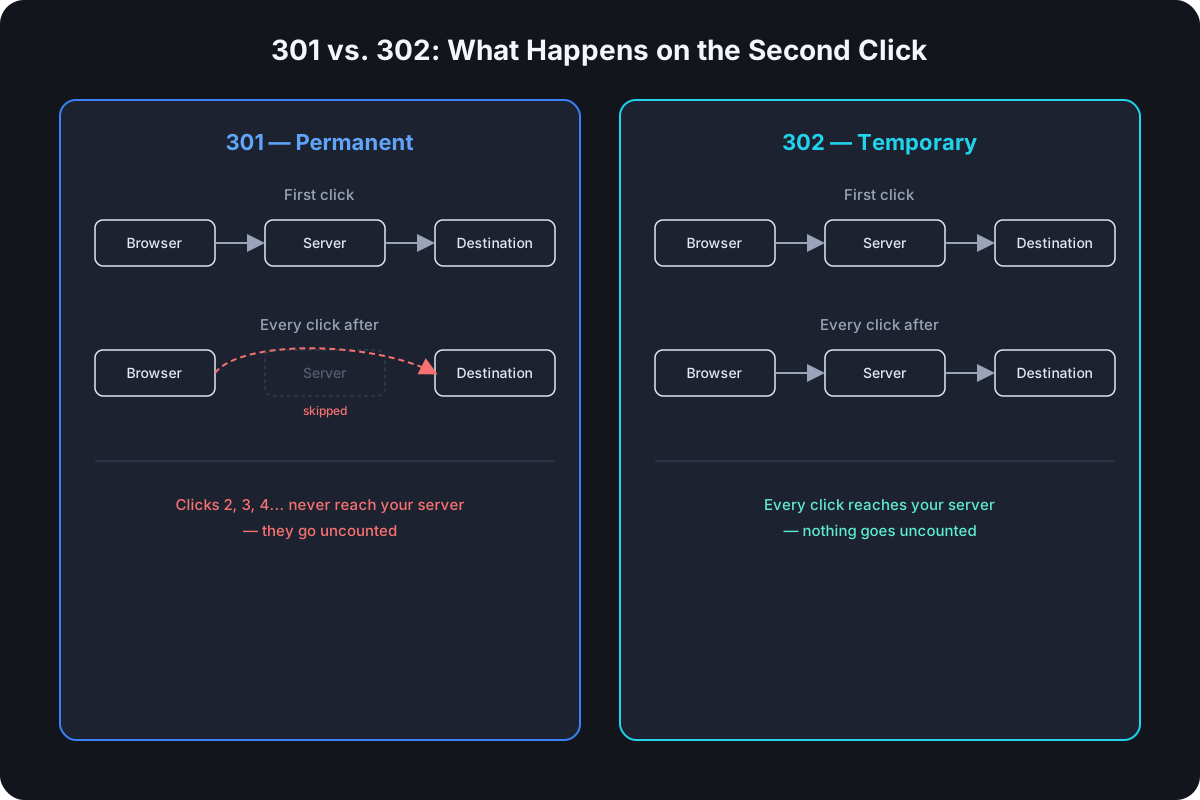
Browsers and CDNs are allowed to cache a 301 response and reuse it without asking the origin server again. A 302 is generally not cached the same way by default — clients treat it as something that needs re-checking every time.
That distinction plays out like this on a real short link:
- Someone clicks
cut.bd/launchfor the first time. Whether it's a 301 or a 302, their browser hits your server, gets redirected, and lands on the destination. - They click the same link again a week later. If it was a 302, their browser hits your server again — same as the first time. If it was a 301, a browser that cached the redirect can skip your server entirely and jump straight to the destination it remembered.
The redirect still works either way. The difference only shows up in what your server actually sees.
Why This Breaks Analytics
Every click that a cached 301 lets a browser skip is a click your server never gets asked about — which means it's a click that never shows up in your dashboard. Bookmark a short link, click it five times over a month, and a 301-based shortener might only ever record the first one. The other four happened, drove real traffic, and are simply invisible.
This isn't a hypothetical edge case. Short links are disproportionately likely to be reused — printed on packaging, saved in a bio, bookmarked from a slide deck — which is exactly the pattern that triggers repeat, uncounted clicks under a 301.
Why This Also Breaks the Ability to Change a Destination
A shortener's whole value proposition includes being able to update where a link points without reprinting anything. A cached 301 undermines that too: if a visitor's browser already remembers the old destination, changing your database doesn't change what happens when that visitor clicks the link again — their cached redirect wins until it expires or they clear it, which could be days, weeks, or never.
A 302 sidesteps this entirely, because there's nothing durable cached to override. Every click asks your server fresh, so a destination change takes effect on the very next click, for everyone.
When 301 Actually Makes Sense
There's a narrow, legitimate case for it: a link that will genuinely never change and where you don't need click data at all — for instance, a permanent redirect baked into your own infrastructure rather than a customer-facing shortened link. The moment either of those conditions isn't true — the destination might change, or you want accurate analytics — 302 is the right default, not 301.
SEO Implications
The common worry is that a "temporary" 302 signals to search engines not to transfer ranking value to the destination, while a "permanent" 301 does. Google has said publicly that it treats 301 and 302 similarly for consolidating ranking signals in most cases today, so the historical gap between them matters far less than it used to. More importantly, for a URL shortener specifically, the redirect happens between the short link and the destination — search engines index and rank the destination page itself, not the short link sitting in front of it. Whether URL shorteners hurt SEO at all is a separate, narrower question than the 301-vs-302 choice, and the honest answer is: not for the destination page, regardless of which code the shortener uses.
What Cut.bd (and Most Production Shorteners) Actually Use
Cut.bd defaults every short link to a 302 redirect, specifically so click analytics stay accurate and destinations can be updated without worrying about a visitor's browser holding onto a stale cached redirect. Every click reaches the server, gets logged with the same device, location, and referrer data as any other, and the destination can change at any time without breaking anything for returning visitors.
Frequently Asked Questions
Does Google penalize sites for using 302 redirects? No — there's no penalty for using the semantically correct temporary redirect. The outdated concern was about ranking signal transfer, not a penalty, and Google has since clarified it handles both similarly for that purpose in most cases.
Can I switch a link from 302 to 301 later, once I'm sure the destination won't change? Technically yes, but there's rarely a reason to. The analytics cost of losing repeat-click visibility almost always outweighs the marginal caching benefit for a link a person or system is actively managing.
What's the difference between 302 and 307? They're both "temporary" redirects, but 307 strictly guarantees the request method and body are preserved on redirect, while 302 has historically been handled inconsistently across clients (some convert a POST to a GET). For a browser click on a short link, this distinction rarely matters — but it matters if you're redirecting API requests rather than browser navigation.
Do browsers ever cache a 302? They can, if the response includes explicit Cache-Control or Expires headers saying to — but that's an explicit opt-in, not default behavior the way 301 caching effectively is. A shortener that doesn't set those headers on its 302 responses keeps every click live.
For the redirect choice in context alongside the rest of what a URL shortener API actually does — endpoints, auth, short code generation, rate limits — see our complete URL shortener API guide.
Where Cut.bd Fits
If you're building your own shortener and want to see this decision in context alongside the rest of what a shortener actually does under the hood, our guide to how URL shorteners work covers the redirect mechanics end to end, including how short codes themselves get generated.
Found this useful? Share it.
Try Cut.bd's link shortener — free, no account required.
Shorten a link