A/B Testing Landing Pages Using Short Links
You don't need dedicated A/B testing software to compare two landing pages — two short links and a way to split who sees which one covers the core of it. The mechanics are almost embarrassingly simple; what actually separates a real test from a coin flip dressed up as data is how the traffic gets split and whether enough of it arrives before anyone declares a winner.
The Setup: Two Variants, Two Links
The whole structure is one decision repeated twice:
- Two landing page variants — same offer, one deliberate difference: a headline, a hero image, a pricing presentation. One difference, not five, or you won't know which change caused whatever you measure.
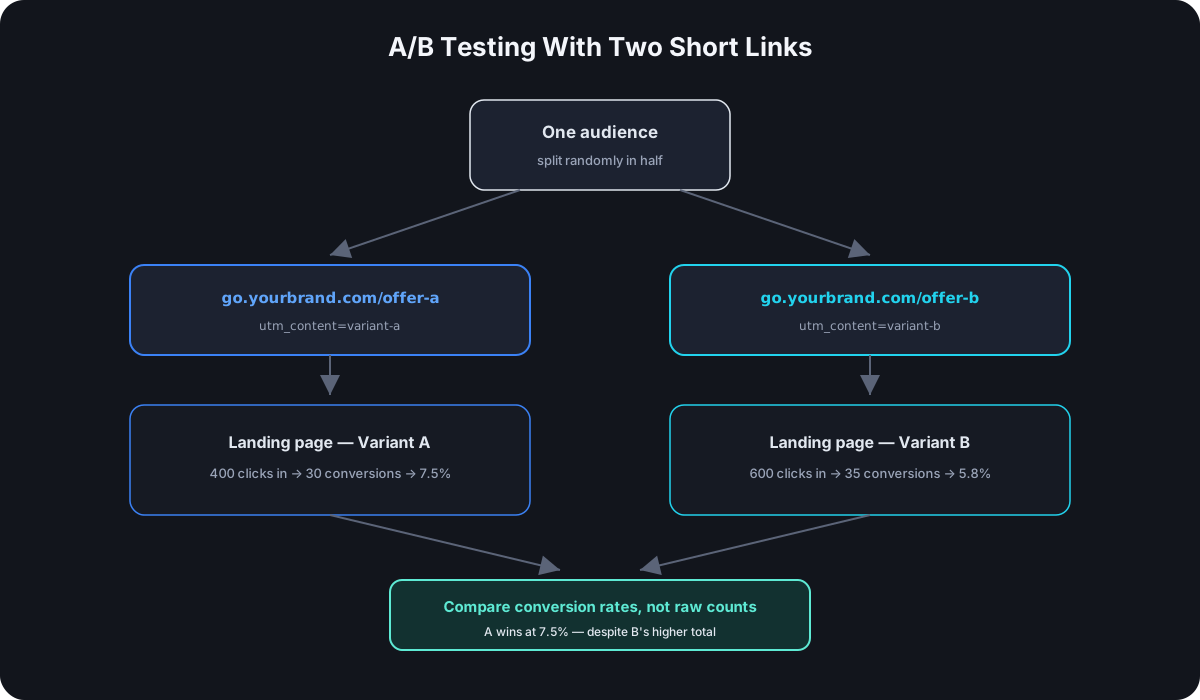
- One tracked short link per variant —
go.yourbrand.com/offer-apointing at variant A,go.yourbrand.com/offer-bpointing at variant B, each with its own UTM tags (utm_content=variant-a/utm_content=variant-b, everything else identical) so your analytics tool sees them as the same campaign with two arms. - A split in who receives which link — the part that decides whether your results mean anything at all.
How to Split Traffic Honestly
The split is where informal tests quietly fall apart. Options, from weakest to strongest:
- Different channels per variant — variant A to your newsletter, variant B on social. This is not an A/B test of the landing pages; it's a comparison of your newsletter audience against your social audience with a landing page attached. Different audiences, different intent, different results — regardless of which page is better.
- Different time windows — variant A this week, variant B next week. Better, but still confounded by anything that changes between weeks: a holiday, a competitor's launch, a platform algorithm shift.
- Random assignment within the same channel and window — split your email list randomly in half, each half gets one link; or alternate which link goes out across otherwise-identical placements. This is the honest version: same audience, same time, same context, only the destination differs.
If the split isn't random within one audience, the test measures the split, not the pages.
Reading the Results
Each short link's click count tells you how many people entered each arm — that's your denominator, and it's the piece the short links give you for free. The numerator is what happened after the click: signups, purchases, whatever the page exists to produce, measured per variant in your analytics via the utm_content tag riding along on each link.
Two numbers per variant — visitors in, conversions out — and the comparison is conversion rate, not raw conversions. Variant A converting 30 of 400 visitors (7.5%) is beating variant B converting 35 of 600 (5.8%) even though B has more total conversions.
When Is a Result Real?
Small samples lie constantly. A 7-vs-4 conversion difference is noise; nobody should redesign a page over it. There's a real statistical test for this (a two-proportion z-test, and free calculators for it are everywhere — search "A/B test significance calculator"), but the practical rules of thumb that prevent most bad calls:
- Decide the sample size before starting — pick a target per arm (hundreds of clicks each, minimum, for typical conversion-rate differences) and run until it's reached. Not until the result looks exciting.
- Don't peek and stop early. Checking daily and stopping the moment one variant pulls ahead is the single most common way teams convince themselves noise is signal — early leads flip constantly.
- Run full weeks, not partial ones — weekday and weekend traffic behave differently, and a test that catches one variant's arm mostly on weekends is quietly biased.
Mistakes That Invalidate the Test
- Changing a variant mid-test. The moment either page changes, the data before and after the change describe different things. Restart the count.
- Reusing one of the links elsewhere during the test. If
offer-aalso goes out in an unrelated post mid-test, its arm just absorbed a different audience — the split is no longer clean. Campaign links should be single-purpose for the duration, the same one-link-per-placement discipline that makes cross-platform tracking work. - Testing during an anomaly — a sale, a press mention, a viral moment. The traffic arriving during an anomaly isn't the traffic your normal pages will face.
- Declaring the winner on clicks instead of conversions. The short links measure entry into each arm; the pages are judged by what happens after entry. A variant whose link got more clicks tells you about the link's placement, not the page.
What Short Links Add Over Raw URLs Here
Nothing about the statistics requires short links — so why use them? Three practical reasons: the per-link click counts give you clean per-arm denominators without touching your analytics setup; the custom aliases keep the two arms visually distinct and human-readable during a test that may involve several people; and if a variant needs to be retired after the test, its link can be redirected to the winner instantly — every old share of the losing link quietly starts sending people to the better page, instead of dead-ending.
If Your Shortener Has Native A/B Testing
Some platforms — Cut.bd's Single plan and above included — offer built-in A/B testing that automates the traffic split behind a single link, instead of requiring two separately managed short links. That removes the manual setup described above, but not the discipline behind it: sample size, honest randomization, and waiting for a real result instead of an early lead all still apply exactly the same way, whether the split happens automatically or you're building it yourself with two links and a UTM tag.
Frequently Asked Questions
Can I test more than two variants at once? Yes — the setup extends naturally to three or four links/variants. The cost is sample size: every added arm needs its own few hundred clicks, so the same traffic that powers a clean two-arm test spreads thin across four.
Do I need special A/B testing software for this? Not for the link-splitting approach described here — two links, honest random assignment, and an analytics tool that reads UTM tags cover it. Dedicated tools add server-side splitting on a single URL, which matters when you can't control link distribution yourself.
How long should the test run? Until the predetermined sample size is reached, in full-week increments — for most small-to-medium audiences that's two to four weeks, not two to four days.
What if the two variants tie? A tie at adequate sample size is a real answer: the change you tested doesn't matter to your audience. Keep whichever page you prefer for other reasons and test something with more contrast next.
Where Cut.bd Fits
Cut.bd's Single plan and above include native A/B testing, so the traffic split described in this guide happens automatically rather than requiring two manually managed links — though the statistical discipline above still applies regardless of which way you run it. On lower tiers, or for a quick manual test, the two-link setup works today too: custom aliases for each arm, the built-in UTM builder for consistent variant tags, per-link click counts for your denominators, and editable destinations so the losing arm can be pointed at the winning page the moment the test concludes. See the complete UTM guide for the tagging conventions either approach relies on.
Found this useful? Share it.
Try Cut.bd's link shortener — free, no account required.
Shorten a link