Rate Limiting Best Practices for Link APIs
Most rate limit problems aren't actually about the limit — they're about how a client behaves once it hits one. A hardcoded retry loop, a missing backoff, an integration that ignores the response headers entirely: these turn a normal, expected 429 into a cascading failure. Good API rate limiting best practices are mostly about the client side of that relationship, not the server's.
Read the Rate Limit Headers Before You Need Them
Every well-built API tells you where you stand on every response, not just on a 429:
X-RateLimit-Limit: 60
X-RateLimit-Remaining: 12
X-RateLimit-Reset: 1721400000
Retry-After: 12
X-RateLimit-Remaining hitting zero is your early warning — checking it after every response lets an integration slow itself down before it actually gets throttled, instead of finding out by failing. Header names vary slightly between providers (some use the IETF's draft standard RateLimit-* headers, others use custom X-RateLimit-* ones), so the first thing to check in any new integration is which headers the specific API actually returns — don't assume.
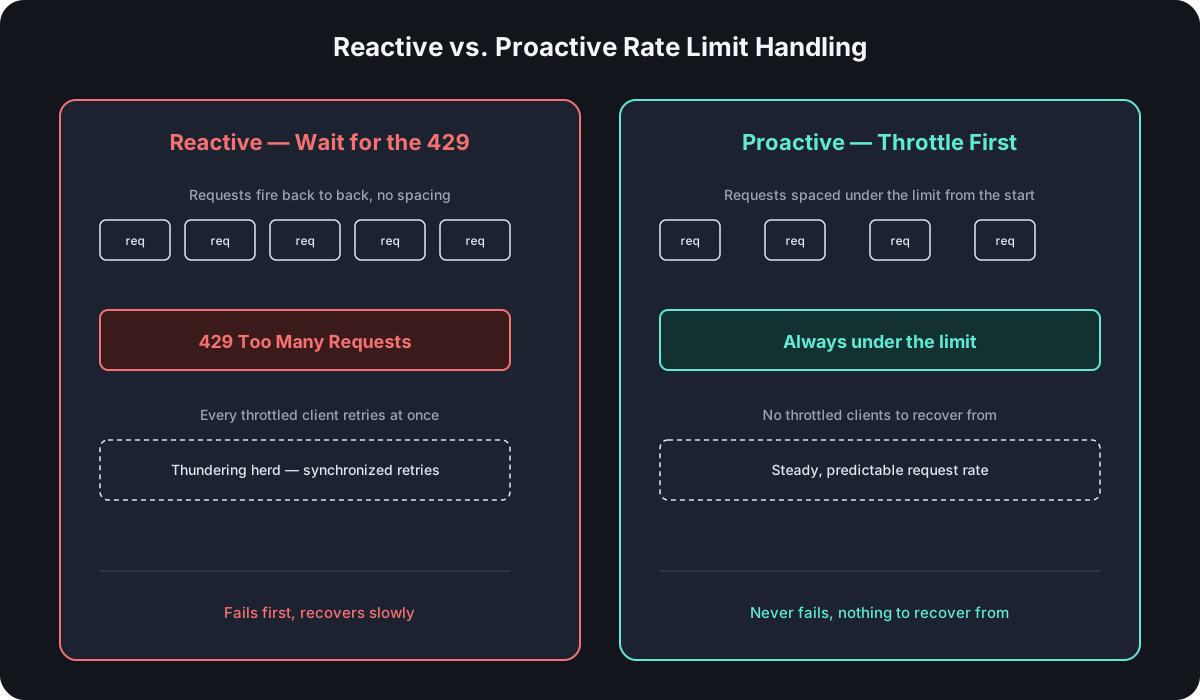
Throttle Proactively, Don't Wait for the 429
The simplest fix for most rate limit problems is spacing requests out before hitting the ceiling, not reacting after:
class RateLimiter {
  constructor(requestsPerMinute) {
    this.interval = 60000 / requestsPerMinute
    this.lastRequest = 0
  }

  async schedule(fn) {
    const now = Date.now()
    const wait = Math.max(0, this.lastRequest + this.interval - now)
    this.lastRequest = now + wait
    await new Promise((resolve) => setTimeout(resolve, wait))
    return fn()
  }
}

const limiter = new RateLimiter(60) // 60 requests per minute

for (const url of urlsToShorten) {
  await limiter.schedule(() => createShortLink(url))
}
This is deliberately simple — a fixed interval between requests, no burst allowance — but it's enough to keep a bulk import or a loop of link creations comfortably under a documented ceiling without ever seeing a 429 in normal operation.
Exponential Backoff on 429, Not Fixed-Interval Retry
When a 429 does happen, how you retry matters as much as whether you retry. A fixed-interval retry — try again in exactly 2 seconds, every time — tends to create a "thundering herd": every client that got throttled at the same moment retries at the same moment, hits the limit again together, and repeats the cycle. Exponential backoff with jitter avoids that by spreading retries out and growing the delay each time:
async function requestWithBackoff(fn, maxRetries = 5) {
  for (let attempt = 0; attempt < maxRetries; attempt++) {
    const res = await fn()
    if (res.status !== 429) return res

    const retryAfter = res.headers.get('Retry-After')
    const delay = retryAfter
      ? Number(retryAfter) * 1000
      : Math.min(2 ** attempt * 1000, 30000) + Math.random() * 1000

    await new Promise((resolve) => setTimeout(resolve, delay))
  }
  throw new Error('Rate limit retries exhausted')
}
Note the priority order: if the API sent a Retry-After header, use that value directly — it's the server telling you exactly how long to wait, and it's more accurate than anything you'd compute yourself. Only fall back to a calculated exponential delay when the header isn't present.
Batch Where the API Allows It
Every request you don't have to make is rate-limit budget you don't spend. If an API offers a bulk or batch endpoint, using it for anything beyond a handful of links is close to free — the same total work costs a fraction of the individual-request rate limit allowance. Comparing URL shortener APIs covers which providers actually offer a real batch endpoint versus expecting you to loop.
Don't Retry Blindly — Distinguish Retryable From Non-Retryable Errors
A 429 or a 503 means "try again later" — the request itself was fine, the timing wasn't. A 400, 401, or 404 means the request itself is wrong, and retrying it changes nothing except wasting another call against your rate limit. A retry loop that doesn't check the status code before retrying will happily burn through its entire budget retrying a permanently malformed request instead of failing fast and surfacing the actual problem.
Design Rate Limits Into the Integration From Day One
The best time to think about rate limits is before the integration hits them in production, not after:
- Estimate real request volume, including growth, and compare it against the documented limit for the plan tier you'll actually pay for — not the top tier shown in marketing copy.
- Monitor
X-RateLimit-Remainingin normal operation, not just when something fails, so a growing integration gets caught before it starts throttling instead of after. - Prefer a queue over a tight loop for anything creating more than a few links in one operation — a queue with a controlled processing rate is inherently rate-limit-safe; a
forloop firing requests as fast as the event loop allows is not.
If You're the One Building the API
Everything above is client-side advice; if you're implementing a rate limiter yourself — following along with building your own shortener in Node.js, for instance — the same headers and behaviors need to exist on the server side too:
- Rate limit per API key, not per IP. IPs get shared behind NAT and corporate proxies, and rotate on many cloud platforms; API keys identify the actual client reliably.
- Return the same headers your own integration would want to read —
X-RateLimit-Limit,X-RateLimit-Remaining, andRetry-Afteron a429specifically, so any client (including your future self) can implement the proactive throttling and backoff patterns above instead of guessing. - A token bucket or sliding window counter — tracked per key, typically in Redis for anything beyond a single process — is the standard approach; a naive fixed-window counter has a well-known edge case where a client can burst up to 2x the intended limit right at a window boundary.
Frequently Asked Questions
What's a reasonable rate limit to design for, as an API consumer? Whatever the documented limit for the plan tier you're actually paying for — not the top tier, and not a number you're hoping to grow into. Build for the limit you have today and revisit it when you actually approach it.
Should I cache rate limit headers across requests? Read them fresh on every response — X-RateLimit-Remaining changes with every request that counts against your limit, so a cached value goes stale immediately and defeats the point of checking it.
Is exponential backoff overkill for a low-volume integration? No — it costs nothing to implement and only ever matters on the rare occasion you do hit a limit, at which point the difference between a clean recovery and a retry storm is entirely down to whether backoff exists.
Do webhooks avoid rate limit problems? Partially — a webhook that pushes click events to you avoids the request volume of polling an analytics endpoint on a timer, but any webhook consumer that reacts by immediately calling back into the API still needs the same throttling and backoff discipline.
Where Cut.bd Fits
Cut.bd's API documents rate limits per plan — from 3 requests/minute on Free up to 360 on Ultimate — with the standard headers on every response so the patterns in this guide apply directly. See the complete URL shortener API guide for how rate limiting fits alongside authentication, endpoints, and redirect mechanics, or the API reference for the exact limits per tier.
Found this useful? Share it.
Try Cut.bd's link shortener — free, no account required.
Shorten a link