How to Build Your Own URL Shortener with Node.js
This is a working URL shortener in under 60 lines of Node.js — enough to actually understand how the pieces fit together, not just read about them. It's deliberately minimal: an in-memory store instead of a database, no auth, no rate limiting. That's the point. Once you've built the smallest version that works, it's obvious what a production shortener actually has to add on top.
What We're Building
Two endpoints, one in-memory store:
POST /shorten— accepts a long URL, generates a short code, stores the mapping.GET /:code— looks up the code and redirects to the destination.
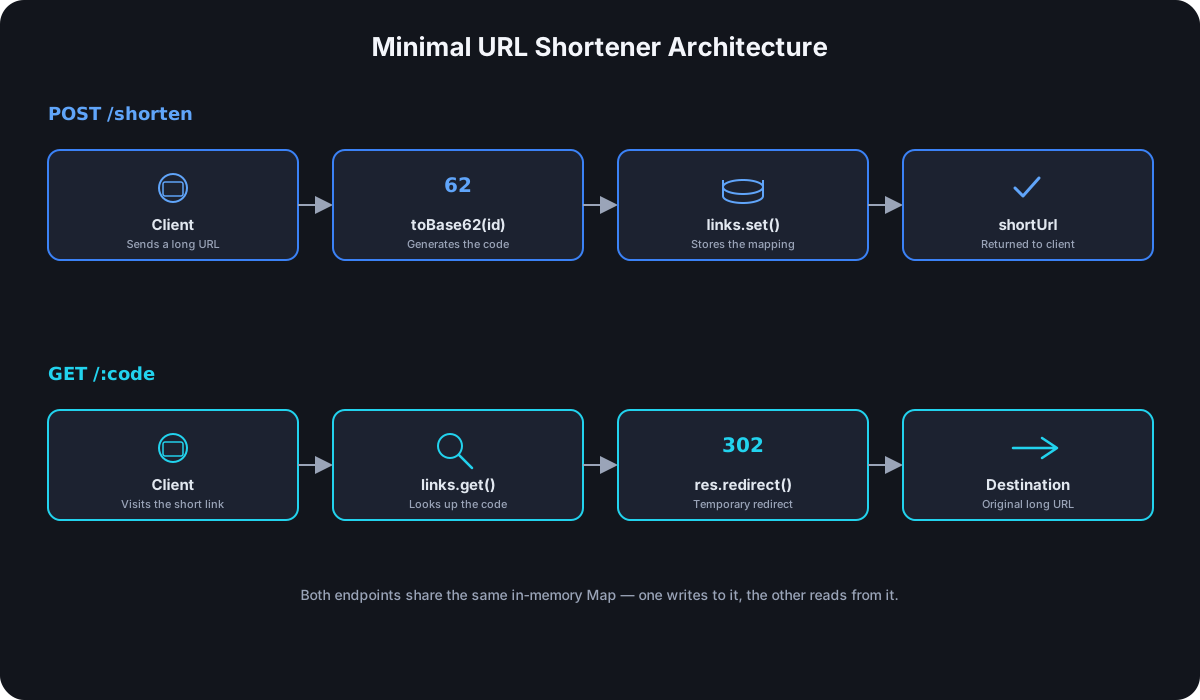
Project Setup
mkdir url-shortener && cd url-shortener
npm init -y
npm install express
That's the only dependency this needs. No framework beyond Express, no database driver yet.
Generating Short Codes
Reuse the same Base62 approach every production shortener uses — an auto-incrementing ID, encoded into the 62 characters 0-9, a-z, A-Z. If you want the full explanation of why this specific encoding, how URL shorteners generate short codes covers the math; here's just the implementation:
const ALPHABET = '0123456789abcdefghijklmnopqrstuvwxyzABCDEFGHIJKLMNOPQRSTUVWXYZ'

function toBase62(id) {
  let code = ''
  while (id > 0) {
    code = ALPHABET[id % 62] + code
    id = Math.floor(id / 62)
  }
  return code || '0'
}
Storing Links
An in-memory Map is enough to prove the concept — it's fast, needs zero setup, and makes the redirect logic trivial to follow. It also means every link disappears the moment the process restarts, which is exactly why this isn't a production datastore. Swapping it for SQLite, Postgres, or Redis later doesn't change anything else in this tutorial; only this one piece.
const links = new Map()
let nextId = 1
The Shorten Endpoint
const express = require('express')
const app = express()
app.use(express.json())

app.post('/shorten', (req, res) => {
  const { url } = req.body

  if (!url || !isValidUrl(url)) {
    return res.status(400).json({ error: 'A valid url is required' })
  }

  const id = nextId++
  const code = toBase62(id)
  links.set(code, url)

  res.json({ shortUrl: `http://localhost:3000/${code}` })
})

function isValidUrl(value) {
  try {
    new URL(value)
    return true
  } catch {
    return false
  }
}
new URL(value) throws if the string isn't a parseable URL, which makes it the simplest correct way to validate one — no regex needed. Everything else here is the same pattern from the Base62 section: take the next ID, encode it, store the mapping.
The Redirect Endpoint
app.get('/:code', (req, res) => {
  const destination = links.get(req.params.code)

  if (!destination) {
    return res.status(404).send('Short link not found')
  }

  res.redirect(302, destination)
})
The status code here isn't arbitrary — it's 302, not 301, on purpose. A cached 301 would let a visitor's browser skip this server entirely on repeat visits, which means repeat clicks stop reaching your code at all. Why 302 is the right default for short links covers exactly why that matters, but the short version: res.redirect(301, destination) would technically still redirect correctly on the first click and quietly break click tracking on every click after it.
Putting It Together
const express = require('express')
const app = express()
app.use(express.json())

const links = new Map()
let nextId = 1
const ALPHABET = '0123456789abcdefghijklmnopqrstuvwxyzABCDEFGHIJKLMNOPQRSTUVWXYZ'

function toBase62(id) {
  let code = ''
  while (id > 0) {
    code = ALPHABET[id % 62] + code
    id = Math.floor(id / 62)
  }
  return code || '0'
}

function isValidUrl(value) {
  try {
    new URL(value)
    return true
  } catch {
    return false
  }
}

app.post('/shorten', (req, res) => {
  const { url } = req.body
  if (!url || !isValidUrl(url)) {
    return res.status(400).json({ error: 'A valid url is required' })
  }
  const id = nextId++
  const code = toBase62(id)
  links.set(code, url)
  res.json({ shortUrl: `http://localhost:3000/${code}` })
})

app.get('/:code', (req, res) => {
  const destination = links.get(req.params.code)
  if (!destination) {
    return res.status(404).send('Short link not found')
  }
  res.redirect(302, destination)
})

app.listen(3000, () => console.log('Shortener running on http://localhost:3000'))
Testing It
curl -X POST http://localhost:3000/shorten \
  -H "Content-Type: application/json" \
  -d '{"url":"https://example.com"}'

# {"shortUrl":"http://localhost:3000/1"}

curl -i http://localhost:3000/1

# HTTP/1.1 302 Found
# Location: https://example.com
That's a functioning shortener — paste a URL in, get a working short link back, visit it, land on the destination.
What's Missing for Production
None of the following is hard individually, but together they're the actual difference between a tutorial and a product:
- A real database. An in-memory
Maploses every link on restart and doesn't work across more than one server process at all. - Collision handling under concurrent writes. Two requests hitting
nextId++at the same instant is unlikely to cause a real bug in this single-threaded example, but a distributed setup with multiple server instances needs an actual uniqueness constraint at the database level, not a shared in-memory counter. - Click analytics — device, location, referrer, timestamp — none of which this version records at all, just the redirect itself.
- Rate limiting, so one client can't exhaust the ID space or hammer the shorten endpoint.
- Custom domains, link expiry, and password protection — all standard on hosted shorteners, none of them a redirect endpoint handles by default.
Frequently Asked Questions
Why Express instead of a framework like Fastify or plain Node.js http? Express is the most common choice for a first version because its routing and middleware conventions are widely known, which keeps the tutorial focused on the shortener logic rather than the framework. The core logic — generate a code, store a mapping, redirect on lookup — is identical no matter which framework wraps it.
Can I use this in production as-is? Not safely — swap the Map for a real database before anything public touches it, since every link currently lives only in process memory.
How do I add custom short codes instead of auto-generated ones? Skip the toBase62 call and let the request body specify its own code, then check links.has(code) before accepting it — same uniqueness check, just user-supplied input instead of a generated one. See custom vs. generic short URLs for when that's actually worth offering.
What happens if two people request the same custom code at once? With an in-memory Map, whichever request runs second silently overwrites the first — a real bug this tutorial doesn't handle. A production system needs a database-level unique constraint that rejects the second write instead of overwriting silently.
This tutorial covers the build-it-yourself path specifically — for the full picture of what a production URL shortener API needs, including how to evaluate hosted options instead, see our complete URL shortener API guide.
Where Cut.bd Fits
If building and maintaining all of the above isn't the actual goal — you just need reliable short links with analytics, a custom domain, and an API — Cut.bd's API already handles everything in the "what's missing" list above, including the same Base62 short codes and 302 redirects this tutorial builds by hand.
Found this useful? Share it.
Try Cut.bd's link shortener — free, no account required.
Shorten a link