API Authentication: API Keys vs OAuth
"API key or OAuth" gets treated like a technical preference, the way you'd pick a request library or a date format. It isn't one — the two authenticate fundamentally different things, and picking the wrong one doesn't just mean more setup work, it can mean building an integration that structurally can't do what it needs to. Authentication is one piece of what a URL shortener API needs to get right — this is the deep dive on that one piece specifically.
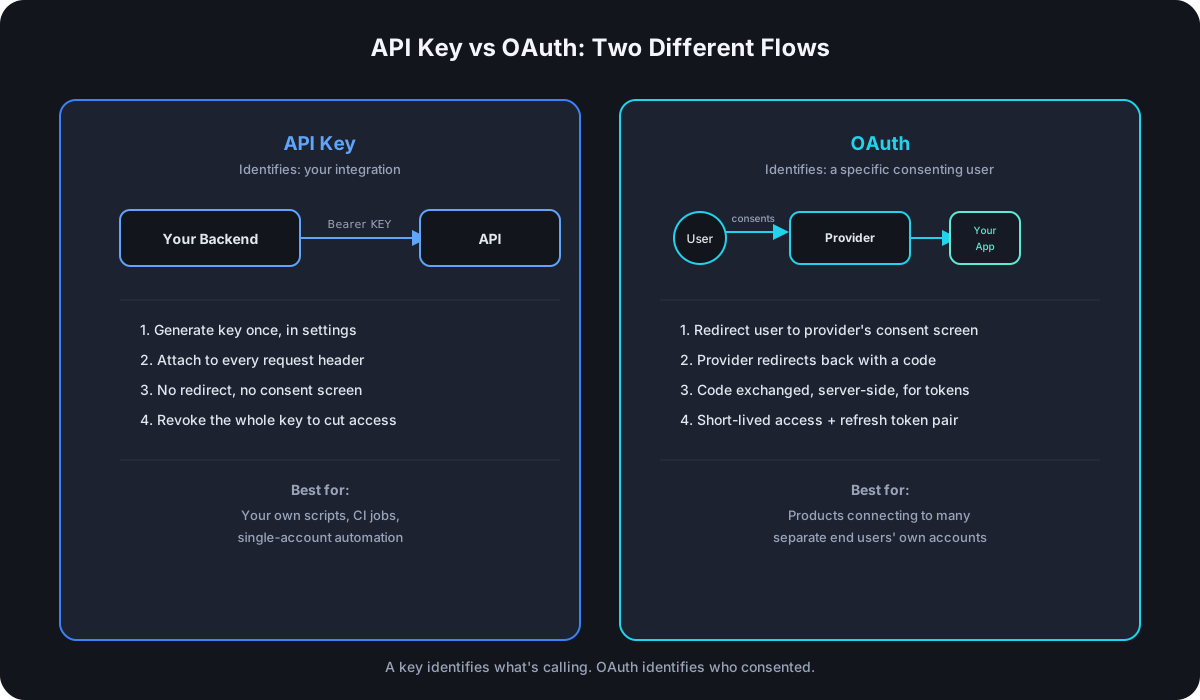
What an API Key Actually Authenticates
An API key is a static secret string, sent with every request — typically as Authorization: Bearer YOUR_KEY — that identifies your integration or account, not a specific person. It's the right model when your code is acting as itself: a backend service creating links, a CI pipeline shortening a deploy URL, a script that runs under one account and never needs to distinguish between different end users on the other side of the request. There's no handshake, no redirect, no consent screen — you generate the key once and attach it to every call from then on.
What OAuth Actually Solves That an API Key Doesn't
OAuth exists for a structurally different problem: your product needs to act on behalf of someone else's account, with their explicit, revocable permission, without ever seeing their password. The flow looks nothing like an API key because it's solving for consent, not just identification:
- Your app redirects the user to the provider's own site to log in and approve exactly what you're asking for.
- The provider redirects back with a short-lived authorization code.
- Your backend exchanges that code, server-to-server, for an access token — and usually a longer-lived refresh token alongside it.
- Your app uses the access token on the user's behalf until it expires, then uses the refresh token to get a new one without asking the user to log in again.
The access token is deliberately short-lived so a leaked one has a small blast radius, and the whole flow's point is that your app never handles the user's actual password at any step — only a token scoped to what they approved.
The Real Difference: What Identity Gets Authenticated
| API Key | OAuth | |
|---|---|---|
| Identifies | An integration or account (yours) | A specific end user (consenting, not yours) |
| Setup | Generate once, attach to every request | Multi-step redirect + token exchange |
| Who sees it | Only your own backend | The end user sees a consent screen naming exactly what's being requested |
| Revocation granularity | Revoke the whole key | Revoke one user's access without touching anyone else's |
| Typical use case | Your own automation, scripts, single-account integrations | A product that connects to many different users' own separate accounts |
When You Actually Need Each One
An API key is enough — and simpler, correctly — the moment your integration only ever needs to act as a single account: your own product creating links programmatically, a script run by your own team, a CI job shortening a build artifact URL. Nothing about that scenario involves a second party's consent, so adding OAuth on top would just be complexity with no problem to solve.
OAuth becomes necessary the moment your product is built for other people to connect their own accounts to it — a marketing tool that lets each customer link their own shortener account, a Zapier-style integration acting per end user rather than per your own account. That's the one case an API key structurally can't cover: a single static key can't distinguish between requests you're making for yourself and requests you're making on behalf of a specific person who granted permission and could, at any point, revoke it without affecting anyone else. If you're picking a provider based partly on which auth model it supports, the full API comparison covers auth alongside rate limits, bulk endpoints, and self-hosted options across the major options.
Practical Key Hygiene, Regardless of Which You Use
- Scope keys to what they actually need. A key that only needs to create links shouldn't also be able to delete domains — narrower scopes limit the damage if a key ever leaks.
- Use separate keys per environment. A development key and a production key should never be the same secret; a leak in a staging environment shouldn't be able to touch production data.
- Set an expiry when the use case allows it. A key generated for a one-off migration script doesn't need to remain valid indefinitely after the script finishes running.
- Never commit a key to source control, including in a private repo — git history is effectively permanent, and a key that touched a commit once should be treated as compromised even after being removed from the latest version.
- Revoke immediately on suspicion, not confirmation. Waiting for proof of misuse before revoking a possibly-leaked key trades a small inconvenience now for a larger risk window.
- Watch your rate limit independent of key hygiene. Designing an integration around documented rate limits is a separate discipline from securing the key itself, but the two show up in the same settings page and get conflated often enough to mention here.
Frequently Asked Questions
Is an API key less secure than OAuth? Not inherently — they secure different things. A well-scoped, properly stored API key used for its actual intended case (your own single-account integration) isn't a weaker choice than OAuth used for the same case; it's the right tool. OAuth's security advantage only materializes for the delegated-access problem it was built for.
Can an API key be stolen the same way an OAuth token can? Yes, and arguably with a larger blast radius — an API key is typically long-lived and broadly scoped unless you deliberately narrow it, while an OAuth access token is usually short-lived by design, limiting how long a leaked one stays useful.
Do I need OAuth just because my product has multiple users? No — if those users are all internal to your own account (your team's seats, for example), an API key still works. OAuth specifically matters when the "multiple users" are external, each with their own separate account on the provider you're integrating with.
Should an API respond with a generic error for both a missing and an invalid key? For security purposes, yes — distinguishing "no key provided" from "wrong key provided" in the response can help an attacker narrow down whether they're close to a valid credential; a single generic 401 Unauthorized for both is the safer default.
How should an API actually store submitted keys server-side? As a hash, not the raw value — verification only requires comparing a hash of the incoming key against a stored hash, which means the raw key never needs to be recoverable, even by the provider itself. Storing it reversibly (encrypted rather than hashed) is unnecessary risk for a value that's never supposed to be looked up in plaintext again.
Where Cut.bd Fits
Cut.bd's REST API (/api/v1/public/*) authenticates with a scoped API key sent as Authorization: Bearer, created from Settings → API Keys with a label, a chosen set of permission scopes (links:read, links:write, analytics:read, and more, down to the individual resource), and an optional expiry — the key is shown exactly once at creation, and can be revoked instantly from the same settings page. Storage follows the same discipline as account passwords: keys are kept as per-row salted SHA-256 hashes, never in a reversible form, so the raw key can't be recovered from the database even by Cut.bd itself. If your use case is a single-account integration — the vast majority of what a URL shortener API gets used for — that covers it completely; if you have a genuine multi-tenant delegated-access requirement beyond that, that's worth confirming directly against the current API reference.
Found this useful? Share it.
Try Cut.bd's link shortener — free, no account required.
Shorten a link