How to Measure ROI on Shortened Campaign Links
A link analytics dashboard full of clicks isn't ROI — it's the easy half of the problem. Clicks are cheap to measure because they happen on infrastructure you control. Revenue happens somewhere else entirely, usually in a checkout flow or a CRM, and connecting the two is the part that actually determines whether a campaign worked.
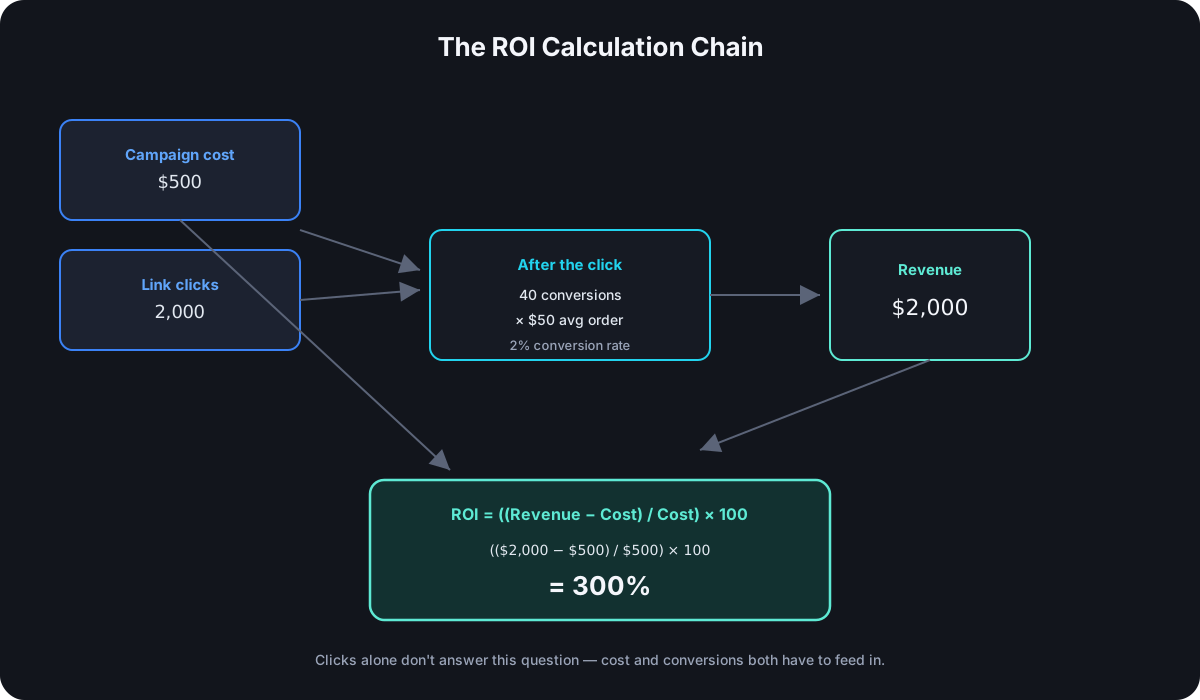
The ROI Formula, Actually
The math itself is one line:
ROI = ((Revenue − Cost) / Cost) × 100
Nothing complicated about the formula. What's actually hard is making "Revenue" a real, defensible number tied specifically to this campaign — not total sales for the period, not a guess, but revenue you can trace back to people who came through this specific tagged link.
What Link Analytics Actually Give You
A tracked short link hands you the top of the funnel cleanly: clicks, device, location, referrer, timing — everything a shortener's analytics measure happens the moment someone clicks, on infrastructure that sees the event directly. That data answers "how many people showed up," which is necessary for an ROI calculation but nowhere close to sufficient. A click is not a sale. The gap between "clicked" and "bought" is where ROI actually lives, and no link analytics dashboard closes that gap by itself.
Connecting Clicks to Revenue
This is the actual hard part, and it depends on UTM attribution surviving from the click all the way to the conversion event:
- The tagged link's parameters need to reach your analytics or e-commerce platform intact — most tools (GA4, Shopify, and similar) can attribute a purchase back to the UTM values present on the session that led to it, as long as nothing strips those parameters along the way.
- Attribution breaks silently when sessions don't persist. Someone clicks a campaign link today and buys three days later from a bookmark or a direct visit — depending on your analytics tool's attribution window and model, that purchase may get credited to "direct" instead of the campaign that actually drove it.
- Multi-touch journeys complicate single-link attribution further — if someone clicks your email link, then later your social link, then converts, first-click and last-click attribution will credit different links for the same sale. Know which model your analytics tool uses before trusting a per-link revenue number.
A Worked Example
A campaign with $500 in total cost drove 2,000 clicks through its tagged link, and 40 of those clicks converted at an average order value of $50:
- Revenue: 40 × $50 = $2,000
- ROI: (($2,000 − $500) / $500) × 100 = 300%
- Conversion rate: 40 / 2,000 = 2%
- Cost per click: $500 / 2,000 = $0.25
- Cost per acquisition: $500 / 40 = $12.50
The click count alone — 2,000 — tells you almost nothing about whether this campaign was worth running. The ROI figure, which required knowing both the conversions behind those clicks and the actual cost, is the number that answers that question.
Per-Link vs. Per-Campaign ROI
If a campaign uses multiple tagged links across platforms or placements within an email, the same ROI math applies to each link individually, not just to the campaign in aggregate. This is where the tagging discipline from earlier in this series actually pays off: an aggregate 300% ROI can hide one placement running at 800% and another losing money outright. Per-link ROI is what tells you to spend more on the first and cut the second, instead of just knowing the campaign as a whole was profitable.
Common Mistakes That Distort ROI
- Treating clicks as the success metric. A link with a high click count and zero conversions has a strong top of funnel and a −100% ROI — clicks alone say nothing about whether the campaign paid for itself.
- Undercounting campaign cost. Ad spend is the obvious cost; design time, tool subscriptions, and staff hours are real costs too, and leaving them out inflates ROI artificially.
- Using an attribution window that's too short. A campaign whose typical customer takes two weeks to decide will look far worse than reality if conversions are only counted for 48 hours after the click.
- Comparing raw revenue instead of ROI percentage. A campaign that generated more total revenue isn't necessarily the better one — a smaller campaign with a higher ROI percentage used its budget more efficiently, which is usually the more useful comparison when deciding where to spend next.
What You Need in Place Before You Can Measure This
Three things, all upstream of the actual calculation: tagged links per placement so clicks are attributable to a specific source in the first place, an analytics or e-commerce setup that preserves UTM attribution through to the conversion event, and an honest total for what the campaign actually cost. Skip any one of these and the ROI number that comes out the other end is a guess wearing a percentage sign.
Frequently Asked Questions
Is click-through rate the same thing as ROI? No — CTR measures how many people clicked relative to how many saw the link; ROI measures whether the money spent generated more money back. A campaign can have an excellent CTR and a negative ROI if nobody who clicked converted.
What attribution window should I use? Whatever matches your actual sales cycle — a same-day-purchase product and a considered, multi-week purchase need very different windows, and using a generic default (many tools default to 30 days) without checking it against your own typical time-to-purchase will misattribute conversions in one direction or the other.
Can I calculate ROI without an e-commerce platform? Yes, manually — if you know how many conversions came from a specific tagged link (via a CRM, a signup form, or a sales team confirming source) and what those conversions were worth, the formula works the same way regardless of whether the connection is automated or tracked by hand.
Should low-ROI links be shut down immediately? Not without checking whether the attribution window or conversion tracking is actually capturing their results correctly first — a link that looks unprofitable because conversions aren't being attributed to it isn't the same problem as a link that's genuinely not converting.
Where Cut.bd Fits
Cut.bd's per-link click analytics are the top-of-funnel half of this calculation — device, location, referrer, and timing per tagged link, feeding into whatever attribution setup connects those clicks to revenue on your end. See the complete UTM guide for the tagging discipline that makes per-link ROI possible in the first place.
Found this useful? Share it.
Try Cut.bd's link shortener — free, no account required.
Shorten a link