Email Marketing Link Tracking Best Practices
An email is the one marketing channel you genuinely cannot edit after shipping. A landing page can be fixed, a social post deleted and reposted — a sent email is frozen in tens of thousands of inboxes exactly as it went out. That permanence changes what email link tracking is for: it's not just measurement, it's the only layer of the email you still control after send.
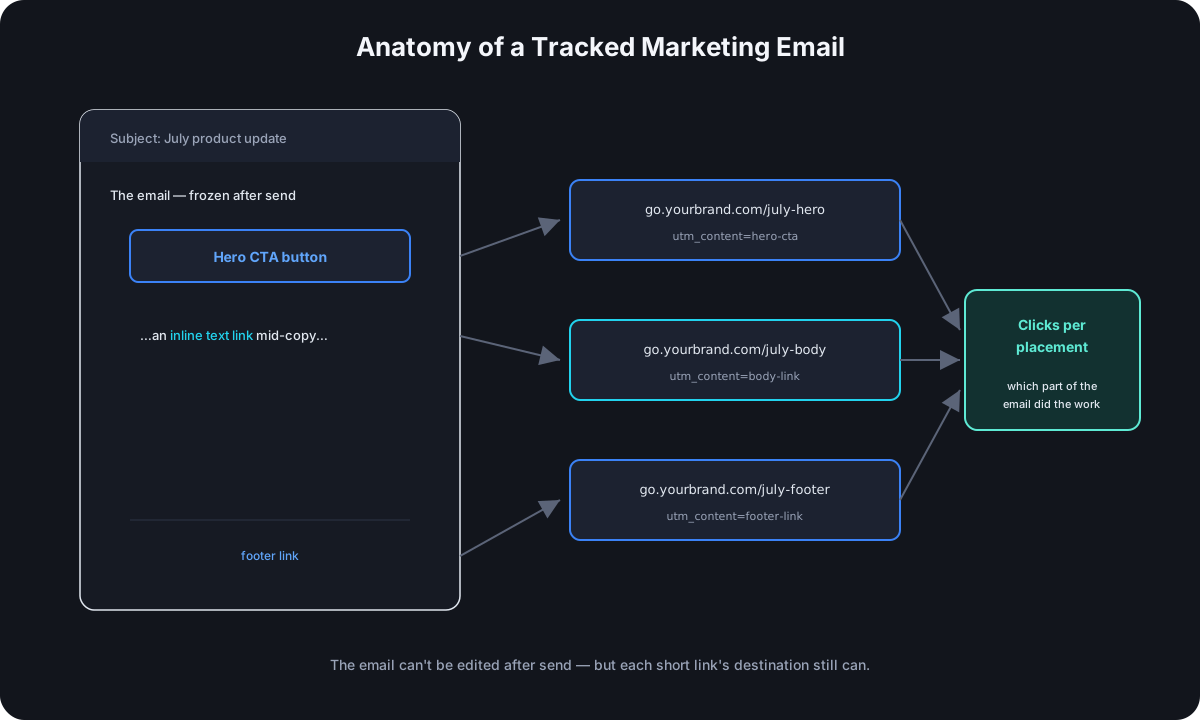
Tag Every Link — and Every Placement Separately
The baseline: every link in a campaign email carries UTM tags, with the campaign-level values identical across the whole email and one value distinguishing placements:
utm_source—newsletter, or the specific list name if you run several.utm_medium—email, consistently, every time.utm_campaign— the specific send:july-product-update.utm_content— the placement within the email:hero-cta,body-link,footer-link.
That last one is where most email tagging stops short. An email usually contains the same destination linked three ways — a hero button, an inline text link, a footer mention — and if all three carry identical tags, you'll never know that (for example) nobody clicks the footer and the inline link outperforms the big button. Per-placement utm_content is the difference between "the email got clicks" and knowing which part of the email did the work.
Know What Your ESP Is Already Doing to Your Links
Most email service providers rewrite every link in your email through their own click-tracking domain — that's how the ESP's own dashboard counts clicks. Your link becomes their redirect, which then forwards to wherever you pointed it. Two practical consequences:
- Your short link still works inside their wrapper. The chain becomes ESP redirect → your short link → destination. Both layers count the click; the numbers in your ESP dashboard and your link analytics should roughly agree, and large disagreements are a debugging signal, not a rounding error.
- The UTM tags survive either way — they live on the final destination URL, and redirect layers pass them through untouched unless something is actively stripping query parameters. Test one link end-to-end from a real received email before a big send, precisely because this chain has more hops than any other channel.
Judge Emails by Clicks, Not Opens
Open rates have been drifting toward unreliable for years — most visibly since Apple's Mail Privacy Protection began pre-loading tracking pixels on behalf of recipients, registering "opens" no human performed. Click data doesn't have this problem: a click requires an actual decision by an actual person. For any email whose job is driving traffic somewhere, click-through — measured per link, per placement — is the metric that still means what it appears to mean, and a tracked link is what produces it.
The Deliverability Angle: Whose Domain Is in Your Email
Spam filters score the domains inside an email's body, not just the sending address — and a generic shortener domain in an email carries the aggregated reputation of everyone who uses that shared domain, including its worst actors. Email is where this mechanism bites hardest, because the penalty isn't a lower click-through rate — it's the whole email landing in spam, taking every other link and the message itself down with it. If there's one channel where a custom domain on your short links moves from nice-to-have to genuinely protective, it's email.
The Unsend Problem — and the One Layer You Still Control
Here's the email-specific case for short links that has nothing to do with analytics: the wrong-link email. The promo that linked to last month's landing page, the button pointing at a staging URL, the typo'd path — every marketer ships one eventually, and the email itself is unfixable the moment it sends.
If the email carried raw URLs, the options are an apology follow-up send or quiet acceptance. If it carried short links with editable destinations, the fix is a thirty-second dashboard edit: repoint the link, and every future click from that frozen email — including from people opening it days later — lands in the right place. Nobody who hasn't clicked yet ever sees the mistake. This works because the email only ever contained the short link; the destination behind it was never baked into the send.
Common Email Link Tracking Mistakes
- Tagging the hero button and nothing else. Untagged secondary links still get clicked — those visits land in analytics as "direct," quietly leaking attribution from your own campaign.
- Inconsistent
utm_campaignvalues between the email and its companion posts. The same launch promoted by email and social should share one campaign name, with the channel split carried byutm_source/utm_medium— the same discipline as cross-platform social tracking. - Visible long tagged URLs in plain-text emails. In HTML email the URL hides behind the link text, but plain-text versions expose the full five-parameter monster. A short link reads cleanly in both.
- Never test-sending to yourself and clicking through. The ESP wrapper, the short link, the UTM tags, the destination — four layers, and a two-minute click test on a real received email is the only way to confirm the whole chain before it goes to the full list.
Frequently Asked Questions
Should I use my ESP's click tracking or my own short links? Both, comfortably — they measure the same clicks from different vantage points. The ESP dashboard ties clicks to individual recipients; your link analytics carry device, location, and referrer detail plus the editable-destination safety net. They complement rather than compete.
Do tracked links hurt email deliverability? Tracking itself doesn't — what matters is domain reputation. A branded short-link domain unique to you is neutral-to-positive; a heavily shared generic shortener domain is the risk case.
Is it worth tagging transactional emails (receipts, password resets) too? Usually not with campaign UTMs — they'd pollute campaign reports with traffic that isn't marketing. If you want visibility into transactional link clicks, use distinct tagging that keeps them separated from campaigns.
How many links should a marketing email have? However many the message needs — the tracking-relevant rule is only that each distinct placement gets a distinct utm_content, so their performance stays distinguishable no matter how many there are.
Where Cut.bd Fits
Cut.bd covers the full email workflow described here: the UTM builder tags each placement consistently, a custom domain on the Free plan keeps a shared shortener domain out of your emails, per-link analytics split clicks by placement, and editable destinations are the safety net for the email you can't unsend. See the complete UTM guide for the tagging conventions that keep it all reporting cleanly.
Found this useful? Share it.
Try Cut.bd's link shortener — free, no account required.
Shorten a link