URL Shortener Security: Preventing Phishing & Abuse
A URL shortener's core feature — hiding a destination behind a short, opaque link — is also exactly what makes it useful for phishing. Whether a short link is safe to click is a question for the person receiving one. This post is the other side of that: if you're building or operating a shortener, what actually has to exist to keep your platform from becoming the thing that question is asking about.
Why Shorteners Are a Natural Phishing Vector
A short link carries no visible information about where it goes — that's the entire point of the format, and it's exactly what an attacker wants when the actual destination is something a target would recognize as suspicious. Beyond hiding the destination from a human, a shortener domain with an established reputation can also slip past spam and email filters that already block known-bad domains directly but haven't yet flagged the shortener's domain — the malicious destination effectively launders itself through a trusted host.
This isn't a hypothetical risk that only affects careless providers. Any shortener that accepts links from the public, with no screening at all, is a phishing distribution tool by default — not through a bug, but through the format working exactly as designed for a use case it wasn't built for.
Destination Screening at Creation Time
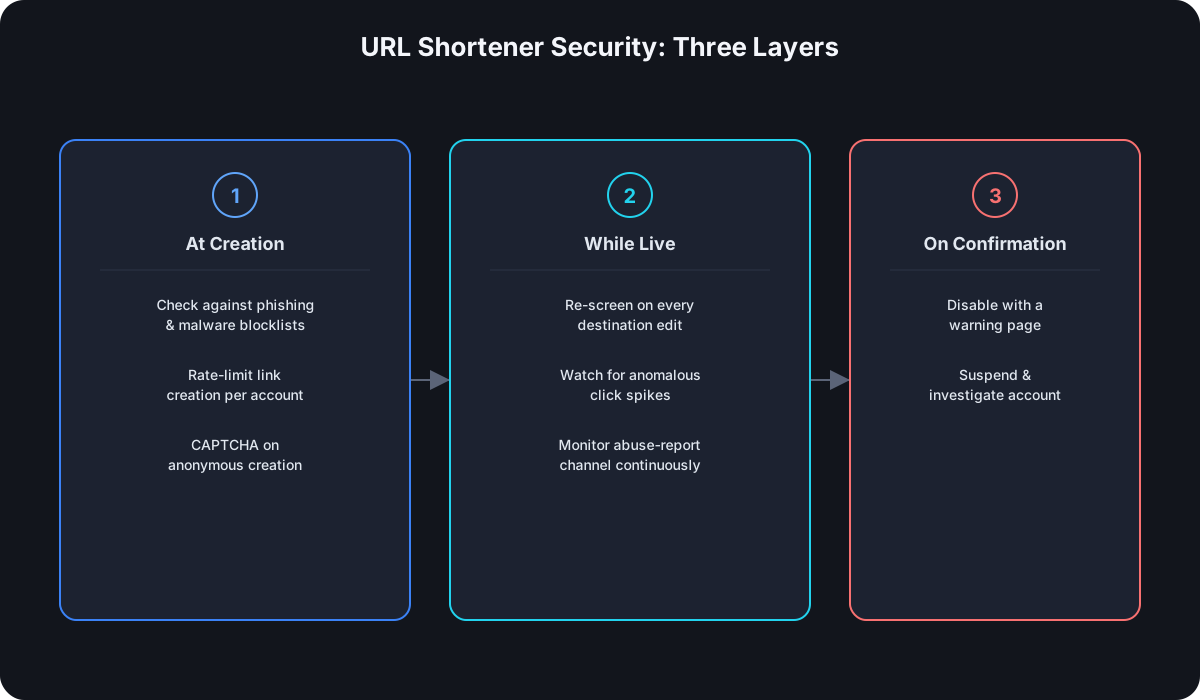
The first layer is checking what you're about to shorten before you shorten it:
- Check submitted URLs against phishing and malware blocklists — services like Google Safe Browsing expose an API specifically for this — before the link is created, not after someone reports it.
- Rate-limit link creation per account, not just per API key for politeness reasons — a compromised or malicious account generating hundreds of links in seconds is a strong abuse signal on its own, independent of what any individual link points to.
- Require account verification for anonymous or free-tier creation. A CAPTCHA or lightweight verification step doesn't stop a determined attacker, but it meaningfully raises the cost of fully automated, large-scale abuse.
Ongoing Monitoring, Not Just a One-Time Check
Screening at creation time misses an entire attack pattern: a link that's legitimate when created and gets swapped to a malicious destination afterward, banking on the fact that most shorteners never re-check a link once it's live. Anything that supports editing a link's destination — which is a real, wanted feature for legitimate use — needs the same screening to run again on every edit, not just at creation.
Click patterns are the other signal worth watching. A sudden spike in clicks on a link that had none, especially from a geographic distribution that doesn't match anything about the account that created it, is worth flagging for review even before any blocklist catches the destination. Abuse detection that only runs once, at creation, is blind to everything that happens to a link after that moment.
What to Do When a Link Is Confirmed Malicious
- Disable the link with a warning page, not a silent 404. Someone who already has the link — including a legitimate person who received it before it was flagged — should see why it stopped working, not just get an unexplained error.
- Suspend or investigate the account that created it, not just the individual link — a confirmed malicious link is rarely the only one from that source.
- Keep an abuse-report channel that actually gets checked. Security researchers and affected users are often the first to notice a phishing campaign using your domain, well before any automated screening catches up.
Preventing Automated Abuse
Most large-scale phishing campaigns through a shortener aren't a person clicking "create" repeatedly — they're a script. The same controls that stop bulk automated abuse also happen to be good API design in general: authenticated API keys instead of fully anonymous access, so a specific key can be identified and revoked; per-account rate limits that catch a burst of creation activity regardless of whether any individual link has been flagged yet; and CAPTCHA or equivalent friction on the anonymous, no-signup path that most shorteners offer for one-off links.
If You're Building Your Own
None of this exists in the minimal Node.js shortener from earlier in this series — that tutorial's POST /shorten accepts any syntactically valid URL with zero screening, and that's an accurate reflection of where "functional" and "production-ready" diverge. Blocklist screening, per-account rate limiting, and abuse monitoring are exactly the kind of operational work that turns a working prototype into something safe to expose publicly.
Frequently Asked Questions
Can blocklist screening catch every phishing link? No — blocklists are reactive by nature, built from links already reported elsewhere, so a genuinely new phishing destination can pass an initial check. That's the actual reason ongoing monitoring after creation matters as much as the initial screen.
Does rate-limiting link creation actually stop determined attackers? Not by itself, but it raises the cost and the visibility of an attack — a script generating thousands of links a minute is a much louder signal than the same volume spread out to stay under a limit, and loud signals get caught faster.
Should a shortener block all anonymous link creation to be safe? That trades away a legitimate, valuable use case — quick one-off links with no signup — to reduce abuse that lighter controls like CAPTCHA and per-session rate limits can meaningfully address without eliminating the feature entirely.
Is HTTPS enforcement on the redirect itself a security feature? Yes, though a narrower one — it protects the integrity of the redirect hop itself from tampering in transit, which is separate from whether the destination it's redirecting to is trustworthy in the first place.
Where Cut.bd Fits
Cut.bd follows a fail-closed approach for anything auth-related — a failure mode defaults to denying access rather than silently allowing it through, which is the same principle behind screening destinations before accepting them rather than after something goes wrong. See the complete URL shortener API guide for how this fits alongside the rest of what a production shortener needs.
Found this useful? Share it.
Try Cut.bd's link shortener — free, no account required.
Shorten a link