Zapier/Make Integration for URL Shortener APIs
"Does it integrate with Zapier?" usually gets answered as yes-or-no based on whether a provider has published an official app in Zapier's directory. That's the wrong test. Any API with documented endpoints and key-based auth — which describes essentially every URL shortener API — can be wired into Zapier or Make today, official app or not, using the generic webhook/HTTP action every automation platform ships with.
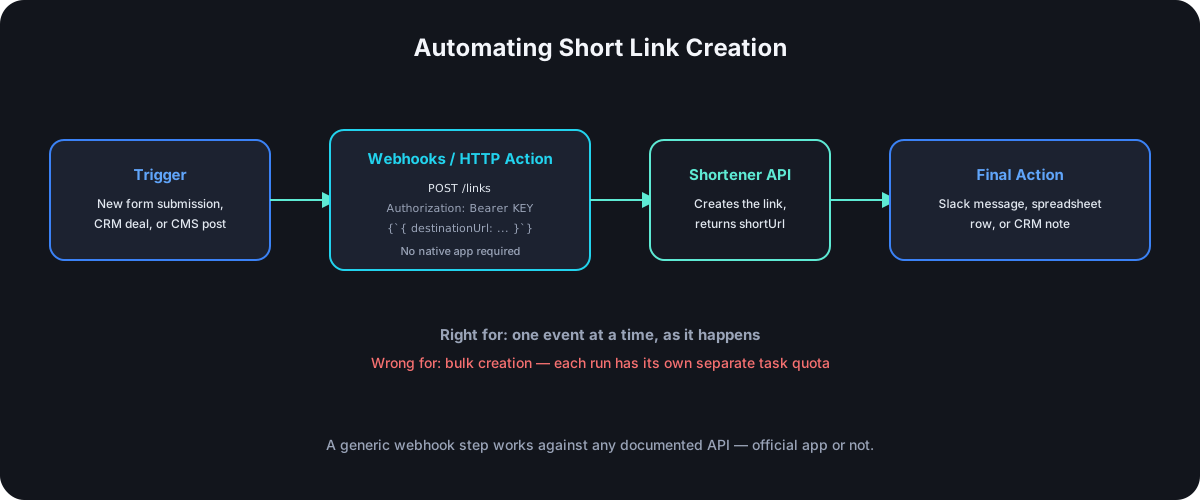
Native App vs. Generic Webhook: What's Actually Different
A native, published app gives you pre-built trigger and action blocks with a form-style UI — dropdowns and labeled fields instead of raw JSON, no need to know the API's exact request shape. It only exists if the provider has actually built and published one to Zapier's or Make's app directory.
The generic approach — Zapier's "Webhooks by Zapier" action, or Make's "HTTP" module — skips the pre-built UI and lets you configure a raw HTTP request directly: method, URL, headers, and body, mapped from whatever trigger data the automation is working with. It's more setup than a native app's dropdowns, but it works against any documented REST API, which means the absence of a native app is a UI inconvenience, not a hard blocker.
Building It Yourself: The Actual Steps
- Generate a scoped API key dedicated to this automation — not a key you're already using elsewhere. Give it only the scopes it needs (
links:writeis usually enough) so a leaked key from this one integration can't touch anything else. - Add a Webhooks/HTTP action to your Zap or Scenario, set to
POST, pointed at the shortener's link-creation endpoint. - Set the
Authorizationheader toBearer YOUR_KEY, andContent-Typetoapplication/json. - Map the request body from your trigger's fields — the destination URL is the one required field; everything else (custom alias, tags, UTM parameters) is optional and depends on what the trigger provides.
- Parse the response for the created short link, then pass it into whatever the next step needs — a Slack message, a spreadsheet row, a reply email.
A Concrete Example: Auto-Shorten Every New CRM Deal's Demo Link
A common real pattern: a sales team's CRM creates a unique demo-booking URL per deal, and every rep manually shortens and shares it. Automated instead:
- Trigger: New deal created in the CRM.
- Action 1: Webhooks/HTTP →
POSTto the shortener's/linksendpoint, with the CRM's demo URL asdestinationUrland the deal's name as atag. - Action 2: Take the
shortUrlfrom Action 1's response and add it as a note on the CRM deal, or send it directly to the rep in Slack.
Nothing here requires a native app — three generic steps, chained together, replace a manual copy-paste task that was happening dozens of times a week.
Where This Breaks Down at Scale
Zapier and Make are built for event-driven, one-at-a-time automation — a form submission, a new row, a status change. Creating thousands of links at once is the wrong shape for this pattern entirely: each automation run consumes a task against your Zapier or Make plan's own quota, completely separate from the shortener API's rate limit, and a large batch run through individual trigger events will hit that ceiling long before it hits the API's. If the actual need is bulk creation, a CSV import or a direct scripted loop against the API is the right tool; Zapier and Make are for reacting to individual events as they happen, not for backfilling a thousand links at once.
Practical Setup Checklist
- Use a dedicated, narrowly-scoped key for this specific automation, not a shared one used elsewhere — see API key hygiene for the full reasoning.
- Test with a single manual run before turning the Zap or Scenario on, so a malformed field mapping doesn't fire against real production data on its first live trigger.
- Handle the failure case explicitly. If the shortener API returns an error — a duplicate alias, a malformed URL — decide what the automation should do: retry, notify someone, or skip and log it, rather than letting it fail silently.
- Watch both quotas, not just one. Your automation platform's task limit and the shortener API's rate limit are two separate ceilings; hitting either one stalls the same workflow.
Frequently Asked Questions
Do I need to know how to code to set this up? No — configuring a Webhooks/HTTP action is form-based (URL, headers, body fields), not scripting, though understanding what a REST API request looks like makes the field mapping much faster to get right.
Is a generic webhook integration less reliable than a native app? Not inherently — both are making the same underlying API calls. A native app mainly buys a nicer setup experience and sometimes built-in retry handling; the actual request going over the wire is equivalent.
Can I trigger an automation when a short link gets clicked, not just when one gets created? That's the reverse direction — webhooks vs. polling for click events covers reacting to clicks specifically, which is a separate integration from the create-a-link flow this guide covers.
What's the most common mistake in a first setup like this? Forgetting the Content-Type: application/json header, or sending the body as form-encoded when the API expects JSON — both produce a request that looks right in the automation's UI but fails validation on the API side.
Where Cut.bd Fits
Cut.bd doesn't have an officially published Zapier or Make app today, but its full REST API and scoped key system work with the generic Webhooks/HTTP approach above with no missing pieces — every field in this guide's example request maps directly onto the documented link-creation endpoint. If a native app matters specifically for your team's setup — a non-technical teammate building automations without touching raw request bodies — that's worth raising directly; the underlying API already supports everything a native app would just be a friendlier face on top of.
Found this useful? Share it.
Try Cut.bd's link shortener — free, no account required.
Shorten a link