Link-in-Bio Analytics: What to Track
Most people check a bio page's analytics once, see a view count and a handful of click numbers next to each item, and consider the job done. Those raw numbers are the input, not the answer — three questions they can actually help answer require doing something with them first, not just glancing at whichever item has the biggest number next to it.
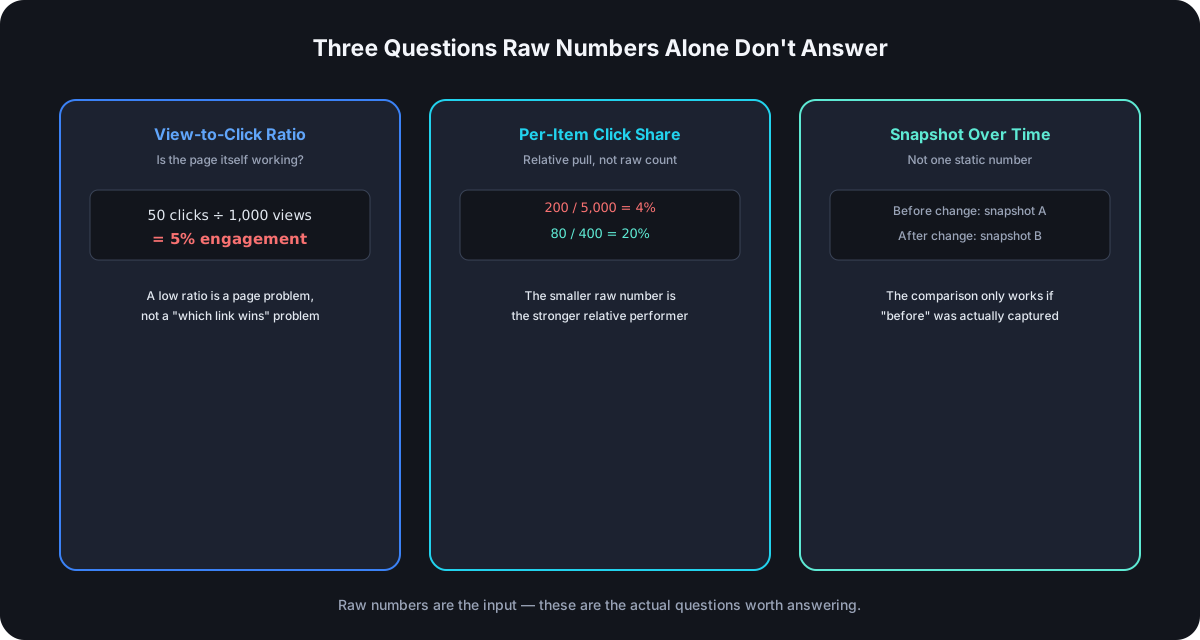
View-to-Click Ratio: Is the Page Itself Working
A bio page reports a view count and a click count per item — divide total clicks across every item by the page's total views, and you get the one number that tells you whether the page itself is doing its job, independent of which specific item wins. A page with 1,000 views and 50 total clicks across everything on it has a 5% engagement rate — a real problem with the page (too many undifferentiated options, an unclear top item, a layout issue) that no amount of reordering individual links will fix, because the issue is upstream of which item gets picked.
Per-Item Click Share, Not Raw Count
A link with 200 clicks sounds strong until you check it against the page's total: 200 out of 5,000 total clicks is 4% of engaged traffic, while a different item with 80 clicks out of 400 total is 20% — a much stronger relative performer despite the smaller raw number. Comparing items to each other by raw click count alone hides this completely; comparing each item's share of total clicks reveals which one is actually pulling disproportionate interest, which is the number worth acting on when deciding what deserves the top position.
Trend Over Time, Not One Static Snapshot
A single check of the numbers is a snapshot, not a trend — the actual useful comparison is before-and-after a specific change: a reorder, a new top item, a launch. Since the reported numbers are running totals rather than a built-in time series, capturing a snapshot right before making a change and checking again a set number of days later is what actually shows whether the change worked, rather than trying to read meaning into one number in isolation with nothing to compare it against.
Where the Traffic Actually Comes From
A bio page's own view count is typically one aggregate total, with no breakdown by which platform sent the visitor — Instagram, TikTok, and a QR code on packaging all pointing at the same page get counted together, with no way to separate them after the fact from the page's own numbers alone. If knowing which specific channel is actually driving bio page traffic matters, a tracked short link with its own referrer and device data placed in that one channel's bio slot — redirecting straight to the bio page — gets you accurate per-channel origin data at the link level, even when the bio page's own view count can't separate it out itself.
What Not to Over-Optimize
Not every low number is a problem worth chasing. A modest click share on a low-priority evergreen item — an "About" link, a static contact page — isn't the same situation as a modest share on whatever's currently the top, time-sensitive priority. Context about what an item is for matters more than its raw position in a sorted list of numbers; optimizing a low-stakes link's click-through rate the same way you'd optimize a launch item's is effort spent where it doesn't move anything that matters.
Tracking This Without Any New Tooling
None of the calculations above need a dedicated analytics tool — a simple running log works. Note the page's view count and each item's click count at a fixed interval (weekly, or right before and after a specific change), and the ratio and share numbers fall out of basic subtraction and division against the previous entry. The discipline that actually matters isn't the tool, it's remembering to capture the snapshot before making a change — a comparison only works if there's a genuine "before" number to compare against, which is the step most people skip until after they've already made the change they wanted to measure.
Frequently Asked Questions
How often should bio page analytics actually get checked? Tied to actual events — right before and after a change, or around a specific campaign — rather than on a fixed daily schedule; checking constantly without anything having changed just produces noise, not insight.
Is a low view-to-click ratio always the page's fault? Usually, but check the traffic source first — a page getting views from a context where clicking isn't the natural next action (a passive scroll-by versus someone who came specifically to find a link) will show a lower ratio for reasons that have nothing to do with the page's own design.
Should every item have roughly equal click share? No — an even split usually means nothing on the page is actually differentiated as the priority, which is often worse than one item clearly dominating, since a working page is supposed to guide attention toward what matters most.
What's the minimum traffic needed before these numbers mean anything? Enough that a single outlier visitor doesn't swing the percentage meaningfully — a few dozen clicks at minimum before treating a share or ratio as a reliable signal rather than noise.
Where Cut.bd Fits
Cut.bd reports a raw view count on the bio page itself and a raw click count on each item — the two real inputs every calculation in this guide is built from. There's no built-in view-to-click ratio, per-item share percentage, or referrer breakdown computed automatically today, so those are calculations worth doing with the numbers directly rather than dashboard metrics to look for. For per-channel origin data specifically, wrapping the link you place in each platform's bio slot as its own tracked short link — with full referrer, device, and timing analytics — before it redirects to the bio page gets you that split at the link level today.
Found this useful? Share it.
Try Cut.bd's link shortener — free, no account required.
Shorten a link